NEWS

Apple Says iOS 27 Can Automatically Add Captions to Your Personal iPhone Videos

05/21/2026

98

Apple Says iOS 27 Can Automatically Add Captions to Your Personal iPhone Videos


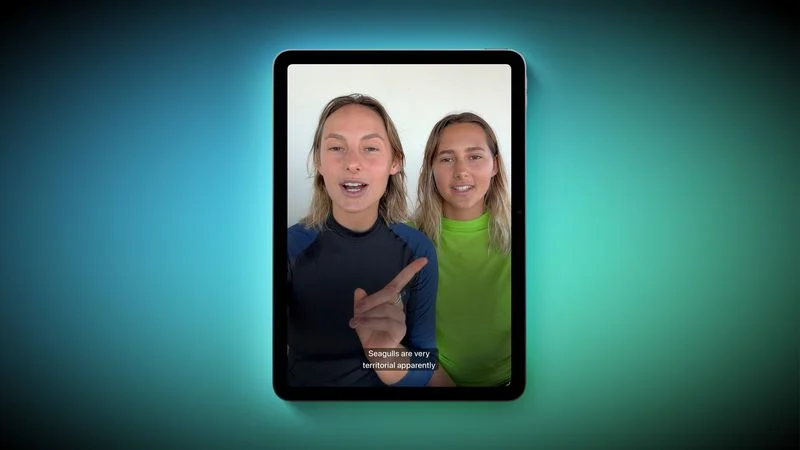
Apple this week previewed new accessibility features that are coming later this year, and one is particularly notable: automatic captions for personal videos.


For videos that do not already have captions, Apple said a new on-device speech recognition model can automatically generate them for spoken audio. According to Apple, this feature will be available for videos that you record on your iPhone, videos that you receive from friends and family, and videos that are streamed online.


The automatic captions will initially be limited to English in the U.S. and Canada.


Apple ensured that the captions are generated privately, and you will be able to customize their appearance in the video playback menu or in the Settings app. The feature will be supported across the iPhone, iPad, Mac, Apple TV, and Vision Pro, with the "later this year" timing pointing to iOS 27, iPadOS 27, macOS 27, tvOS 27, and visionOS 27.


Apple will unveil those software versions during its WWDC 2026 keynote, which begins on Monday, June 8 at 10 a.m. Pacific Time, so we expect to learn more about this feature and its exact implementation in a few weeks from now.


Source: Macrumors

Windows
Mac OS
iOS
Linux
3uTools
Win 64-bit For this device
V9.06 2026-04-09
Download
Win 32-bit For this device
V9.06 2026-04-09
Download
3uTools
Intel Chip How to Identify Chip Type
V9.03 2026-03-27
Download
Apple Silicon
V9.03 2026-03-27
Download
How to Identify Chip Type
1.  Click the Apple icon in the top-left corner of the screen and select About This Mac.
2.  Check the Processor or Chip field to determine if it is "Intel" or "Apple".
Please use the 3uTools PC client to install the iOS client:
1、 Install either the Windows or Mac version of 3uTools on your computer
2、 Open the PC client and connect your device to the computer via USB cable
3、 After the connection is successful, wait for the computer to automatically install the mobile app for the device, or locate “Install Mobile App” on the computer and manually click to install.
3uTools
deb file
V9.0 2026-04-16
Download
rpm file
V9.0 2026-04-16
Download
Windows
Windows
iOS
iOS
Android
Android
TV
TV
3uAirPlayer
Win 64-bit For this device
V6.0.5 2026-04-23
Download
Win 32-bit For this device
V6.0.5 2026-04-23
Download
iOS Device Mirroring (No App Required)
1、 Install 3uAirPlayer on the Windows PC
2、 Open Control Center and select Screen Mirroring
3、 From the list, choose your PC to start mirroring
4、 Or connect your iOS device to the PC via USB to begin mirroring
Scan to get "3uAirPlayer" App
3uAirPlayer TV V1.0.18
2025-11-28
TV System Requirements: Android 7.0 or later
Download the TV installation package, copy it to a USB drive, insert it into your TV or set-top box, then select the file from the home screen to install.