NEWS

Apple iOS’ Notes App Censors Handwritten Swears

08/13/2019

2368

Apple iOS’ Notes App Censors Handwritten Swears


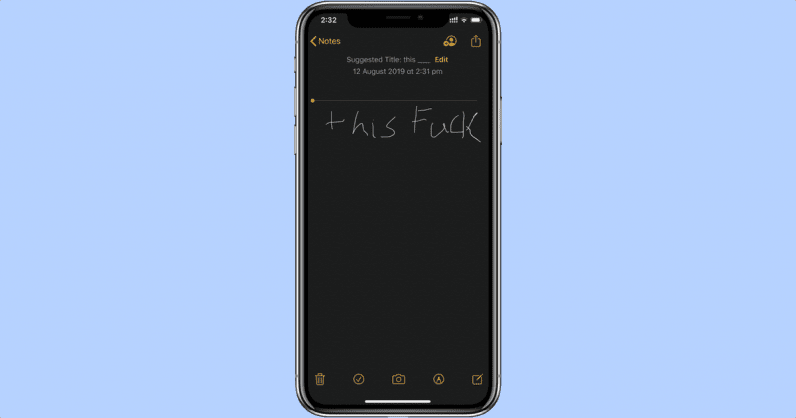
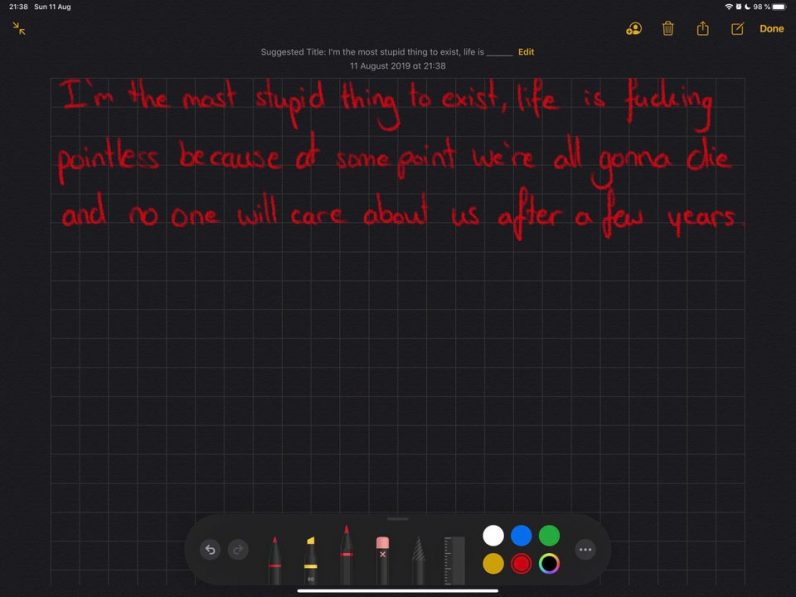
Apple works very hard to maintain a ‘clean’ and family-friendly image. So much so that it censors handwritten words when suggesting a title for notes.


Today, a user in r/iOSBeta subreddit noted the company’s algorithm muted the word ‘fuck’ when recommending a title for the handwritten note.

Apple iOS’ Notes App Censors Handwritten Swears


Apple seems to have introduced this feature in the new iOS 13 beta. I also tried this out on my phone, running the same software, and Apple did indeed censored the word ‘fuck.’ However, Apple doesn’t seem to be muting every cuss word. For instance, it didn’t mute ‘ass.’


We’ve asked Apple for more details, and we’ll update the story accordingly. This is a hilariously bad attempt by Apple to keep its suggestions at a PG-13 level. It’s not clear what the company wants to achieve by this, there are tons of cuss words one can write and Apple might not be able to detect them at all.


Source: thenextweb

Windows
Mac OS
iOS
Linux
3uTools
Win 64-bit For this device
V9.01 2025-12-27
Download
Win 32-bit For this device
V9.01 2025-12-27
Download
3uTools
Intel Chip How to Identify Chip Type
V9.01 2025-12-31
Download
Apple Silicon
V9.01 2025-12-31
Download
How to Identify Chip Type
1.  Click the Apple icon in the top-left corner of the screen and select About This Mac.
2.  Check the Processor or Chip field to determine if it is "Intel" or "Apple".
Please use the 3uTools PC client to install the iOS client:
1、 Install either the Windows or Mac version of 3uTools on your computer
2、 Open the PC client and connect your device to the computer via USB cable
3、 After the connection is successful, wait for the computer to automatically install the mobile app for the device, or locate “Install Mobile App” on the computer and manually click to install.
3uTools
deb file
V3.01 2025-11-20
Download
rpm file
V3.01 2025-11-20
Download
Windows
Windows
iOS
iOS
Android
Android
TV
TV
3uAirPlayer
Win 64-bit For this device
V6.0.2 2025-11-19
Download
Win 32-bit For this device
V6.0.2 2025-11-19
Download
iOS Device Mirroring (No App Required)
1、 Install 3uAirPlayer on the Windows PC
2、 Open Control Center and select Screen Mirroring
3、 From the list, choose your PC to start mirroring
4、 Or connect your iOS device to the PC via USB to begin mirroring
Scan to get "3uAirPlayer" App
3uAirPlayer TV V1.0.18
2025-11-28
TV System Requirements: Android 7.0 or later
Download the TV installation package, copy it to a USB drive, insert it into your TV or set-top box, then select the file from the home screen to install.