 NEWS
NEWS
iPhone Market Share Grows 6.4% in USA
 01/12/2017
 3785
3785
The latest Kantar data shows that the iPhone’s U.S. market share grew 6.4% year-on-year in the three months ending in November of last year. iOS made gains in seven of the nine key markets monitored by the market intelligence company.
The company says that early holiday sales helped three iPhone models top the charts, ahead of Samsung.
The most dramatic iPhone gain was made across the Atlantic in the UK …
Apple gained 9.1% in the UK, mostly at the expense of Windows phones.
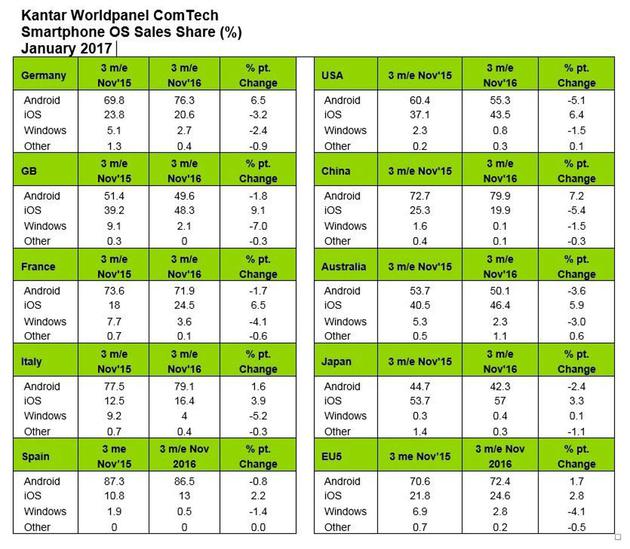
The iPhone grew its market share in Australia, France, Italy, Japan, Spain, the UK and USA, with Android seeing its own share drop in all of these countries bar Italy, where its growth was less than half that of iOS.
Apple lost out in two markets, China where its share fell 5.4% in the face of strong competition from the flagship handsets of local brands, and Germany, where it dropped 3.2% against Android growth of 6.5%.
News in China was not all bad, however. Kantar notes that the iPhone 7 became the best-selling device in Urban China, pushing Oppo’s R9 into second place.
The latest numbers build on the previous month’s Kantar data showing that Apple achieved itsstrongest growth in more than two years, hitting its highest market share since January 2015.
While the iPhone 7 has achieved strong sales, attention is already turning to this year’s iPhone, where analysts are predicting that a ‘super-cycle‘ will see Apple sell even more handsets than it did with the switch to larger screens in the iPhone 6. Check out our recent roundup of everything we expect from the iPhone 8, with a later report suggesting a return to a stainless steel frame.
Source: 9to5mac










