 NEWS
NEWS
2018 OLED iPhones to Support Apple Pencil, with 512GB Top Tier
 08/15/2018
 2960
2960
Apple’s gamble on higher-priced iPhones appears to have paid off, with the iPhone X showing that plenty of people are willing to pay a four-figure sum for the right features.
TrendForce believes Apple may be taking a couple of steps to increase the appeal of this year’s flagship models, and to help further boost the average selling price (ASP).
The company believes that the OLED models will support the Apple Pencil. While that may be of limited use for drawing on a screen size much smaller than an iPad, the Pencil is also useful for taking notes and making annotations, something that may work well, especially on the 6.5-inch Plus model.
There have been long-running reports of Apple Pencil support for future iPhones, encouraged by an apparent slip of the tongue by Tim Cook, in which he talked of having used the two together. Offering iPhone compatibility could significantly boost sales of the accessory.
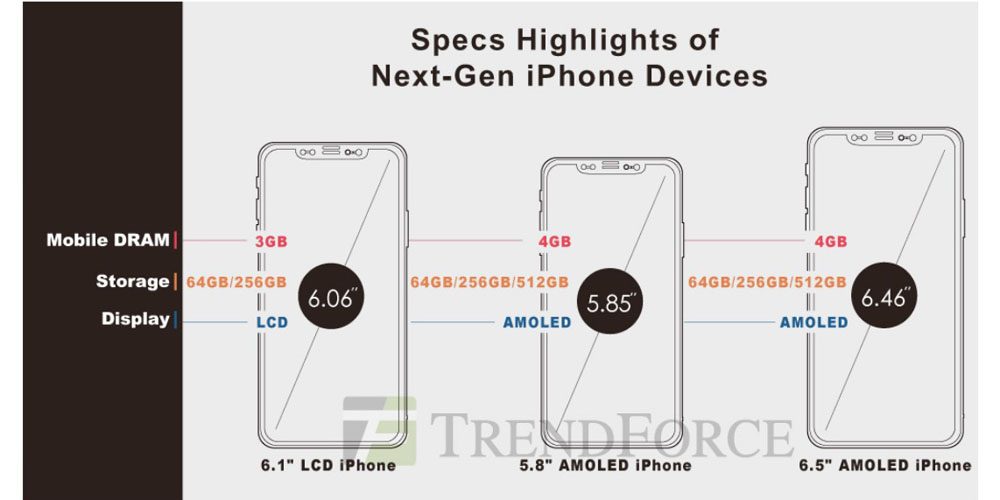
Additionally, TrendForce expects both OLED models to offer three storage tiers rather than the two of the iPhone X. It suggests that in addition to the existing 64GB and 256GB tiers, Apple will also offer a 512GB option. If even a relatively small percentage of buyers opt for this, it will still help increase the ASP.
For the entry-level LCD model, expected to offer something very similar to the iPhone X design at a more affordable price, TrendForce expects Apple to offer 64GB and 256GB tiers, and for the phone to have 3GB RAM in contrast with 4GB for the OLED models.
TrendForce indicates that pricing for the LCD model could start from $699, though gives a range of $699-749 for its estimate. Some analysts have argued it could even be as low as $600.
The company echoes earlier report expects that the OLED models will start from somewhere in the $899-949 range, prices it believes Apple can offer without impacting its margins thanks to lower component pricing.
Source: 9to5mac










