NEWS

iPhone Accessory Maker Shure Claims iOS 11.3 to be Released Next Week, Includes Fix for their Mics

02/26/2018

3026

iPhone Accessory Maker Shure Claims iOS 11.3 to be Released Next Week, Includes Fix for their Mics


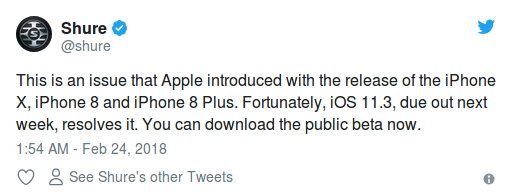
Shure, a company that makes mics for iPhones with Lightning connectivity alongside their range of professional audio gear, claims on Twitter that iOS 11.3 is due out for everyone next week. This is in response to a customer complaint about failed recordings; the company says iOS 11.3 includes a fix for these accessories.


The tweet was first spotted by Piunikaweb.


Whilst generally third-party companies are not privy to Apple’s release schedule, if Shure has been receiving lots of complaints about their mics not working with iPhone 8 and iPhone X, Apple may have reassured them with a timeline for the fix being released.


This still feels somewhat unlikely though. For one, in general, news via customer support on Twitter has a track record of making statements that often don’t pan out. Apple may have told Shure that a resolution to their accessory reliability issues is coming in 11.3 but it’s harder to believe they told them when that would be, beyond what Apple has already announced publicly.

iPhone Accessory Maker Shure Claims iOS 11.3 to be Released Next Week, Includes Fix for their Mics


Whilst the builds are pretty stable, it does not feel ready enough for a release, which makes us less sure of Shure’s claims. Apple merely promised that iOS 11.3 would be released in the ‘spring’.


The ‘spring’ timeframe technically means anytime between the 20 March and 21 June. The current iOS 11.3 beta also still includes the Feedback app, something which is normally removed in the build before the public release.


Source: 9to5mac


Windows
Mac OS
iOS
Linux
3uTools
Win 64-bit For this device
V9.01 2025-12-27
Download
Win 32-bit For this device
V9.01 2025-12-27
Download
3uTools
Intel Chip How to Identify Chip Type
V9.01 2025-12-31
Download
Apple Silicon
V9.01 2025-12-31
Download
How to Identify Chip Type
1.  Click the Apple icon in the top-left corner of the screen and select About This Mac.
2.  Check the Processor or Chip field to determine if it is "Intel" or "Apple".
Please use the 3uTools PC client to install the iOS client:
1、 Install either the Windows or Mac version of 3uTools on your computer
2、 Open the PC client and connect your device to the computer via USB cable
3、 After the connection is successful, wait for the computer to automatically install the mobile app for the device, or locate “Install Mobile App” on the computer and manually click to install.
3uTools
deb file
V3.01 2025-11-20
Download
rpm file
V3.01 2025-11-20
Download
Windows
Windows
iOS
iOS
Android
Android
TV
TV
3uAirPlayer
Win 64-bit For this device
V6.0.2 2025-11-19
Download
Win 32-bit For this device
V6.0.2 2025-11-19
Download
iOS Device Mirroring (No App Required)
1、 Install 3uAirPlayer on the Windows PC
2、 Open Control Center and select Screen Mirroring
3、 From the list, choose your PC to start mirroring
4、 Or connect your iOS device to the PC via USB to begin mirroring
Scan to get "3uAirPlayer" App
3uAirPlayer TV V1.0.18
2025-11-28
TV System Requirements: Android 7.0 or later
Download the TV installation package, copy it to a USB drive, insert it into your TV or set-top box, then select the file from the home screen to install.