
NEWS

Six Southeast Asian Countries to Get Official Online Apple Sales Through Lazada

12/11/2017

2666

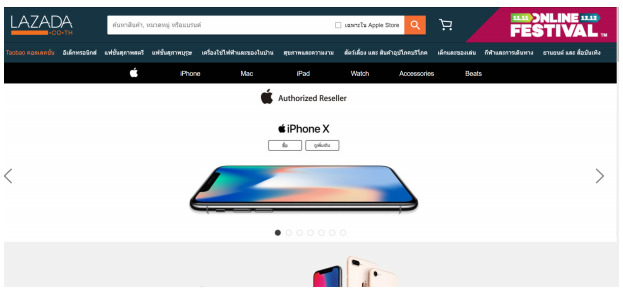
Apple has partnered with Lazada, owned by Alibaba, to bring official online sales of its products to several southeast Asian countries: Indonesia, Thailand, the Philippines, Singapore, Malaysia, and Vietnam.


While sales are beginning in most countries today, Malaysian sales will only start on Monday, and Vietnam will get access at a later unspecified date, TechInAsia reported. Lazada said it will get inventory directly from Apple.
Six Southeast Asian Countries to Get Official Online Apple Sales Through Lazada


Apple has online stores in Thailand, Malaysia, Singapore, and the Philippines, but not Indonesia or Vietnam, and its only retail store in those markets belongs to Singapore.

The Lazada partnership could not only extend Apple's market reach but make it easier for shoppers to avoid the risks of the gray market, such as counterfeit goods and inflated costs.


Source: appleinsider

Windows
Mac OS
iOS
Linux
3uTools
Win 64-bit For this device
V9.01 2025-12-27
Download
Win 32-bit For this device
V9.01 2025-12-27
Download
3uTools
Intel Chip How to Identify Chip Type
V9.01 2025-12-31
Download
Apple Silicon
V9.01 2025-12-31
Download
How to Identify Chip Type
1.  Click the Apple icon in the top-left corner of the screen and select About This Mac.
2.  Check the Processor or Chip field to determine if it is "Intel" or "Apple".
Please use the 3uTools PC client to install the iOS client:
1、 Install either the Windows or Mac version of 3uTools on your computer
2、 Open the PC client and connect your device to the computer via USB cable
3、 After the connection is successful, wait for the computer to automatically install the mobile app for the device, or locate “Install Mobile App” on the computer and manually click to install.
3uTools
deb file
V3.01 2025-11-20
Download
rpm file
V3.01 2025-11-20
Download
Windows
Windows
iOS
iOS
Android
Android
TV
TV
3uAirPlayer
Win 64-bit For this device
V6.0.2 2025-11-19
Download
Win 32-bit For this device
V6.0.2 2025-11-19
Download
iOS Device Mirroring (No App Required)
1、 Install 3uAirPlayer on the Windows PC
2、 Open Control Center and select Screen Mirroring
3、 From the list, choose your PC to start mirroring
4、 Or connect your iOS device to the PC via USB to begin mirroring
Scan to get "3uAirPlayer" App
3uAirPlayer TV V1.0.18
2025-11-28
TV System Requirements: Android 7.0 or later
Download the TV installation package, copy it to a USB drive, insert it into your TV or set-top box, then select the file from the home screen to install.




