
NEWS

Apple's TV App Adds Live 'Sports' Section for iOS 11.2, tvOS 11.2 Testers

11/30/2017

2441

In a preview of a new feature expected to come to all users in December, beta builds of iOS and tvOS have added a live "Sports" section, making it easier to find streaming content.
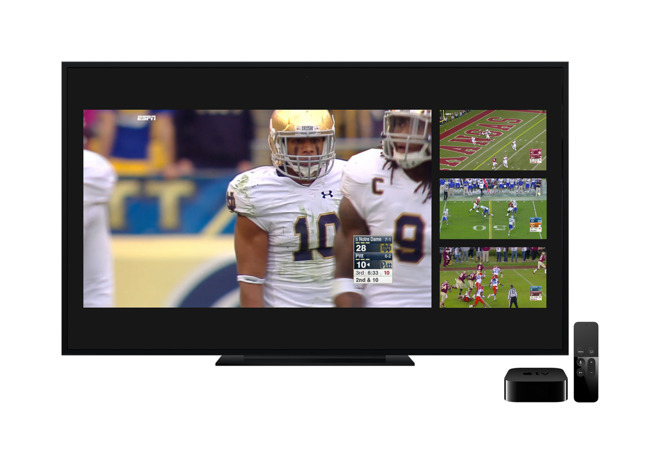

Apple's TV App Adds Live 'Sports' Section for iOS 11.2, tvOS 11.2 Testers

The update comes from a server-side change by Apple, meaning users running the latest developer and public iOS and tvOS 11.2 builds will automatically have access to the new "Sports" tab when opening the TV app.


The "Sports" tab joins the previous options of "Watch Now," "Library," "Store" and "Search." It features quick links to live games and the ability to rewatch games that already occurred.


Users can also select their favorite teams for a range of sports and leagues. The TV app promises users that they will receive an alert when the team is about to play, letting users begin streaming as soon as the game starts.
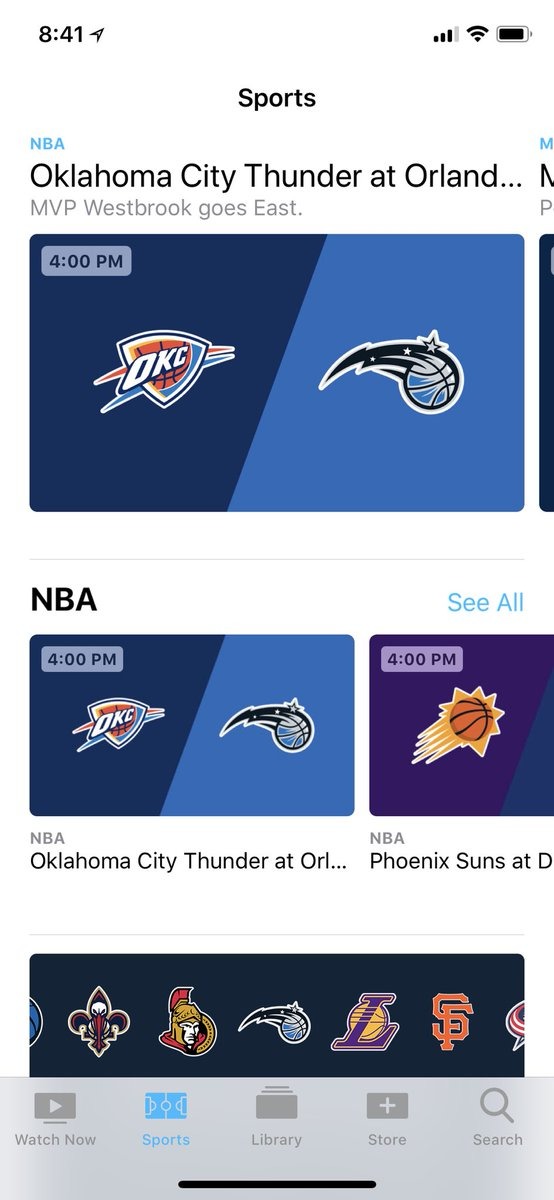

Apple's TV App Adds Live 'Sports' Section for iOS 11.2, tvOS 11.2 Testers


Supported leagues include Major League Baseball, the National Football League, the National Basketball League, college football, men's college basketball and much more. The update was first noted by Mark Gurman.


Wednesday's soft launch appears to only offer ESPN as an app partner, though future updates from other third-party apps should add support for more networks and services. For example, ESPN does not broadcast National Hockey League games, so users cannot yet stream NHL action via the TV app.


Developer support has been something of a sore thumb for Apple's TV app for iOS and tvOS. Notably, streaming giant Netflix does not offer full integration with Apple's TV app.


The fifth developer betas of iOS 11.2 and tvOS 11.2 were released on Tuesday.


Source: appleinsider

Windows
Mac OS
iOS
Linux
3uTools
Win 64-bit For this device
V9.01 2025-12-27
Download
Win 32-bit For this device
V9.01 2025-12-27
Download
3uTools
Intel Chip How to Identify Chip Type
V9.01 2025-12-31
Download
Apple Silicon
V9.01 2025-12-31
Download
How to Identify Chip Type
1.  Click the Apple icon in the top-left corner of the screen and select About This Mac.
2.  Check the Processor or Chip field to determine if it is "Intel" or "Apple".
Please use the 3uTools PC client to install the iOS client:
1、 Install either the Windows or Mac version of 3uTools on your computer
2、 Open the PC client and connect your device to the computer via USB cable
3、 After the connection is successful, wait for the computer to automatically install the mobile app for the device, or locate “Install Mobile App” on the computer and manually click to install.
3uTools
deb file
V3.01 2025-11-20
Download
rpm file
V3.01 2025-11-20
Download
Windows
Windows
iOS
iOS
Android
Android
TV
TV
3uAirPlayer
Win 64-bit For this device
V6.0.2 2025-11-19
Download
Win 32-bit For this device
V6.0.2 2025-11-19
Download
iOS Device Mirroring (No App Required)
1、 Install 3uAirPlayer on the Windows PC
2、 Open Control Center and select Screen Mirroring
3、 From the list, choose your PC to start mirroring
4、 Or connect your iOS device to the PC via USB to begin mirroring
Scan to get "3uAirPlayer" App
3uAirPlayer TV V1.0.18
2025-11-28
TV System Requirements: Android 7.0 or later
Download the TV installation package, copy it to a USB drive, insert it into your TV or set-top box, then select the file from the home screen to install.




