
NEWS

iPhone 8 Camera Allows Users to Customize 3D Animated Emoji Using Facial Expressions

09/11/2017

3453

Following last night's leak of the golden master version of iOS 11, further details of features Apple plans to announce next week continue to be unearthed, including more hints about the new 3D animated emoji for iMessage. 

Based on information in the iOS 11 GM firmware, the new "Animoji", as they're called, appear to be a feature exclusive to Apple's so-called iPhone 8 and the phone's new 3D sensing capability, enabling users to create custom 3D animated emoji based on facial expressions picked up by the camera. 


iPhone 8 Camera Allows Users to Customize 3D Animated Emoji Using Facial Expressions


As noted by developer Steve Troughton-Smith, several Animoji will be available for customization using the iPhone 8's 3D sensing features, including chimps, robots, pigs, cats, poop, chickens, dogs, foxes, and several others unearthed in the software. 

The range of expressions that the iPhone 8 will be able to detect are listed in a separate asset, showing off the level of detail the new camera feature is capable of reading on a human face. Animoji will be able to be customized using movement of the left and right eyebrows, cheeks, chin, eyes, jaw, lips, and mouth, with global detection for sad and happy faces. 
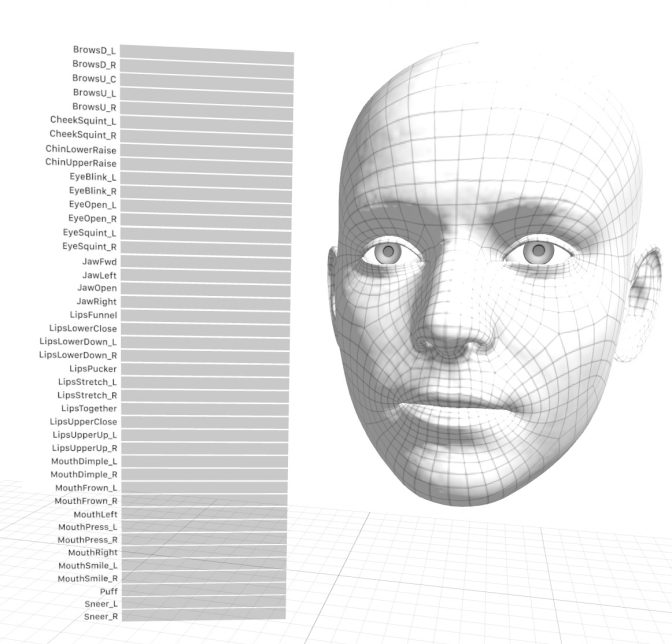
iPhone 8 Camera Allows Users to Customize 3D Animated Emoji Using Facial Expressions


Expect additional discoveries about the iPhone 8 and Apple Watch to be revealed soon as developers scour the iOS 11 GM code over the weekend. Apple will officially unveil the new devices at its Tuesday event set to be held at 10:00 a.m. Pacific Time.


Source: macrumors

Windows
Mac OS
iOS
Linux
3uTools
Win 64-bit For this device
V9.0 2025-11-11
Download
Win 32-bit For this device
V9.0 2025-11-11
Download
3uTools
Intel Chip How to Identify Chip Type
V9.0 2025-12-02
Download
Apple Silicon
V9.0 2025-12-02
Download
How to Identify Chip Type
1.  Click the Apple icon in the top-left corner of the screen and select About This Mac.
2.  Check the Processor or Chip field to determine if it is "Intel" or "Apple".
Please use the 3uTools PC client to install the iOS client:
1、 Install either the Windows or Mac version of 3uTools on your computer
2、 Open the PC client and connect your device to the computer via USB cable
3、 After the connection is successful, wait for the computer to automatically install the mobile app for the device, or locate “Install Mobile App” on the computer and manually click to install.
3uTools
deb file
V3.01 2025-11-20
Download
rpm file
V3.01 2025-11-20
Download
Windows
Windows
iOS
iOS
Android
Android
TV
TV
3uAirPlayer
Win 64-bit For this device
V6.0.2 2025-11-19
Download
Win 32-bit For this device
V6.0.2 2025-11-19
Download
iOS Device Mirroring (No App Required)
1、 Install 3uAirPlayer on the Windows PC
2、 Open Control Center and select Screen Mirroring
3、 From the list, choose your PC to start mirroring
4、 Or connect your iOS device to the PC via USB to begin mirroring
Scan to get "3uAirPlayer" App
3uAirPlayer TV V1.0.18
2025-11-28
TV System Requirements: Android 7.0 or later
Download the TV installation package, copy it to a USB drive, insert it into your TV or set-top box, then select the file from the home screen to install.




