
NEWS

Apple May Build Purchasing and Receiving Facility in Downtown Reno

05/09/2017

2993

Apple may be planning to purchase half a city block in downtown Reno, Nevada, for the purpose of creating a purchasing and receiving facility, reports Reno's KRNV. 

The Reno City Council will discuss Apple's plans to purchase the property, located at 6th Street and Evans Avenue, at a Wednesday meeting. Apple is planning to build the facility alongside a planned data center at the Reno Technology Park, which Apple has been pursuing since 2012. 
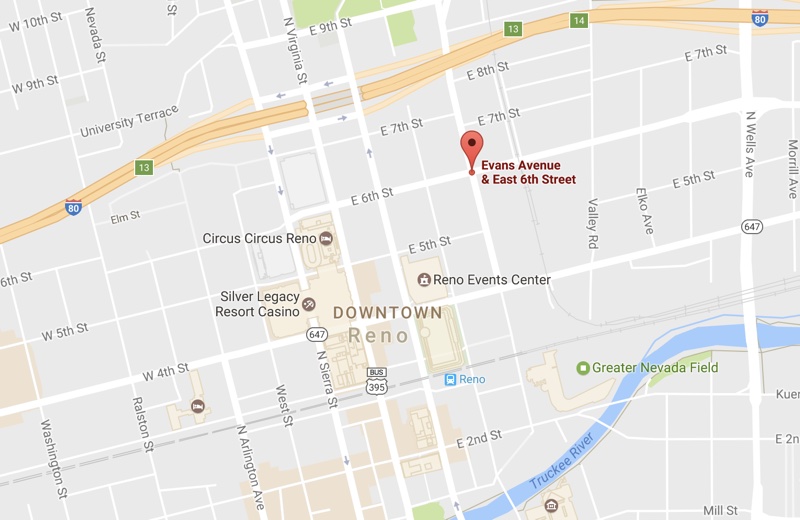
Apple May Build Purchasing and Receiving Facility in Downtown Reno


A filing from an assistant city attorney states that Reno and Urban Development have a reimbursement agreement to allow Apple to buy the land. The agreement would have Apple getting sales tax reimbursements through Urban Development for the cost of buying and adding to projects in the city's Téssera district.


Apple already operates one data center in Reno, and has been expanding on it for several years. When finished, the site will encompass 14 buildings and 412,000 square feet. 

Apple is also planning to build a second data center adjacent to its existing center and requested permission from the city for the project back in early 2016.


Source: macrumors


Windows
Mac OS
iOS
Linux
3uTools
Win 64-bit For this device
V9.0 2025-11-11
Download
Win 32-bit For this device
V9.0 2025-11-11
Download
3uTools
Intel Chip How to Identify Chip Type
V9.0 2025-12-02
Download
Apple Silicon
V9.0 2025-12-02
Download
How to Identify Chip Type
1.  Click the Apple icon in the top-left corner of the screen and select About This Mac.
2.  Check the Processor or Chip field to determine if it is "Intel" or "Apple".
Please use the 3uTools PC client to install the iOS client:
1、 Install either the Windows or Mac version of 3uTools on your computer
2、 Open the PC client and connect your device to the computer via USB cable
3、 After the connection is successful, wait for the computer to automatically install the mobile app for the device, or locate “Install Mobile App” on the computer and manually click to install.
3uTools
deb file
V3.01 2025-11-20
Download
rpm file
V3.01 2025-11-20
Download
Windows
Windows
iOS
iOS
Android
Android
TV
TV
3uAirPlayer
Win 64-bit For this device
V6.0.2 2025-11-19
Download
Win 32-bit For this device
V6.0.2 2025-11-19
Download
iOS Device Mirroring (No App Required)
1、 Install 3uAirPlayer on the Windows PC
2、 Open Control Center and select Screen Mirroring
3、 From the list, choose your PC to start mirroring
4、 Or connect your iOS device to the PC via USB to begin mirroring
Scan to get "3uAirPlayer" App
3uAirPlayer TV V1.0.18
2025-11-28
TV System Requirements: Android 7.0 or later
Download the TV installation package, copy it to a USB drive, insert it into your TV or set-top box, then select the file from the home screen to install.




