NEWS

Apple's Clips Video App Updated with Live Title Editing, Other Improvements

05/04/2017

2695

Apple's Clips Video App Updated with Live Title Editing, Other Improvements


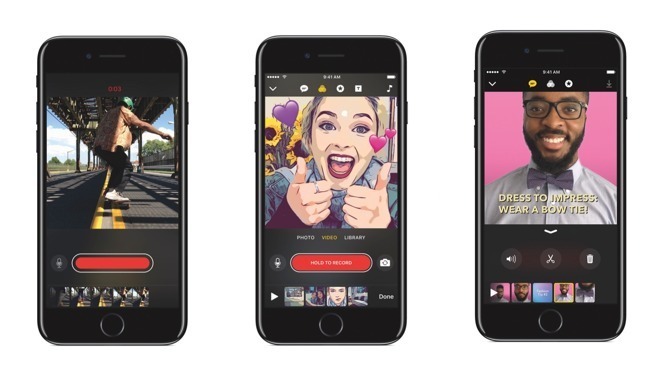
With Clips version 1.0.1, users can now edit Live Title text by tapping on the graphical asset while a video is playing or paused, according to Apple's release notes. Previously, users were required to pause video to edit Live Title text. 

Today's update also introduces new functionality that streamlines the sharing process. Specifically, Clips will now suggest frequently used addresses when sending a finished video to multiple contacts, a useful feature for direct group messaging.

Finally, Apple promises improved stability and reliability when recording video clips and sharing videos that contain certain posters. Similar to Live Title text, posters are full-screen text-based animated images that serve as title cards when placed between clips. 

Clips was introduced for iPhone and iPad in April as an Apple-designed alternative to social media creation tools made popular by companies like Snap and Instagram. The first-party title boasts a range of tools and powerful editing features that allow users to stitch together content of up to 60 minutes in length. 

Like other offerings, Clips comes with filters and emoji support, as well as Live Title text, the latter of which uses iOS technology to translate voice input into speech. Along with saving video creations to Photos, Clips uses share sheets to send content to social networking services like Facebook and YouTube. 

For more information, check out AppleInsider's first look at Clips, which walks through the creation of a short video. 


Source: Appleinsider

Windows
Mac OS
iOS
Linux
3uTools
Win 64-bit For this device
V9.0 2025-11-11
Download
Win 32-bit For this device
V9.0 2025-11-11
Download
3uTools
Intel Chip How to Identify Chip Type
V9.0 2025-12-02
Download
Apple Silicon
V9.0 2025-12-02
Download
How to Identify Chip Type
1.  Click the Apple icon in the top-left corner of the screen and select About This Mac.
2.  Check the Processor or Chip field to determine if it is "Intel" or "Apple".
Please use the 3uTools PC client to install the iOS client:
1、 Install either the Windows or Mac version of 3uTools on your computer
2、 Open the PC client and connect your device to the computer via USB cable
3、 After the connection is successful, wait for the computer to automatically install the mobile app for the device, or locate “Install Mobile App” on the computer and manually click to install.
3uTools
deb file
V3.01 2025-11-20
Download
rpm file
V3.01 2025-11-20
Download
Windows
Windows
iOS
iOS
Android
Android
TV
TV
3uAirPlayer
Win 64-bit For this device
V6.0.2 2025-11-19
Download
Win 32-bit For this device
V6.0.2 2025-11-19
Download
iOS Device Mirroring (No App Required)
1、 Install 3uAirPlayer on the Windows PC
2、 Open Control Center and select Screen Mirroring
3、 From the list, choose your PC to start mirroring
4、 Or connect your iOS device to the PC via USB to begin mirroring
Scan to get "3uAirPlayer" App
3uAirPlayer TV V1.0.18
2025-11-28
TV System Requirements: Android 7.0 or later
Download the TV installation package, copy it to a USB drive, insert it into your TV or set-top box, then select the file from the home screen to install.