 NEWS
NEWS
Bon Appétit Unveils Its First Cover Shot On An iPhone
 04/25/2017
 3123
3123
Magazines like Billboard and Condé Nast Traveler have recently published covers that were photographed on an iPhone, and now Bon Appétit is joining their ranks.
This is basically the final step in bringing smartphone photography into the Condé Nast-owned food magazine. After all, the photos from last year’s Culture issue were shot by iPhones — except for the cover.
In Grossman’s view, the iPhone 7 “works really well picking up people and places.” That’s thanks to technical capabilities like the new Portrait mode, but also due to the fact that when you photograph someone with a smartphone, they don’t get nervous or upset, since it’s something that already happens to everyone “15 times a day.”
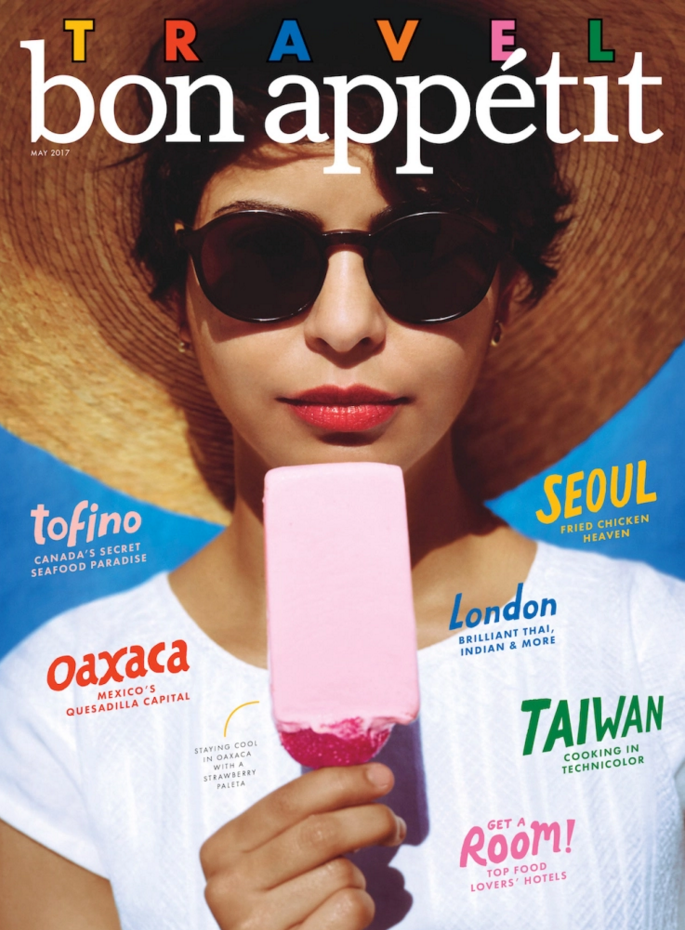
The cover was shot by photographers Peden + Munk, a.k.a. the husband-and-wife team of Taylor Peden and Jen Munkvold. Like Grossman, Peden praised the iPhone’s portability and the “comfortability not having some humongous lens in your face” — it allowed them to work with a tiny crew, so it felt like a “throwback to the early days” of their career.
Moving forward, Grossman said the iPhone can just become another part of Bon Appétit’s toolbox. Sure, it’s not at the point where the photos are completely comparable to “a $25,000 DSLR,” particularly in print — but if you shoot in the right conditions, “99.9 percent of people out there” might not know the difference.
“We always have to be pushing and evolving our aesthetic anyway,” Grossman said. “It doesn’t really matter whether it’s a phone or an illustration or cool type design, we’re always finding new ways, whatever they may be, to push our aesthetic.”
Munkvold added that while some pro photographers might be threatened by the way the iPhone puts a powerful camera in everyone’s hands, “We see it more as: Anything that will elevate the game is welcome.”
Source: techrunch










