NEWS

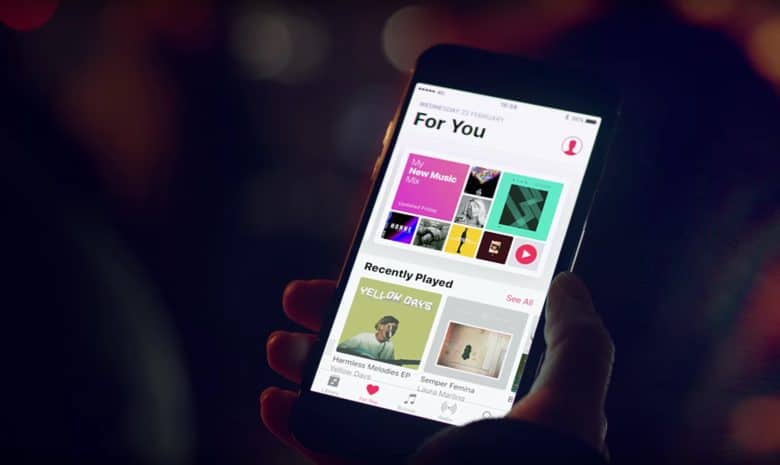
Apple Music is Hooking Up with Facebook Messenger

04/19/2017

3545

Apple Music is Hooking Up with Facebook Messenger


Facebook is aiming to make its Messenger app the go-to spot to talk about music with a new update that makes it easier to share songs with friends.


During the company’s F8 developers conference this morning, Facebook unveiled a new way for third-party apps to integrate with communications platform. And Apple Music is one of its first partners.


Close to the end of his presentation at F8, Messenger boss David Marcus, said, “I’m really excited to share with you that Apple Music will soon be on the platform as well.”


More social Apple Music

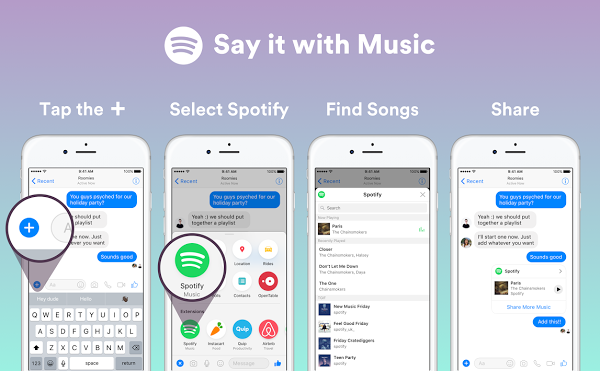
Details on how Apple Music’s extension will work in the app weren’t revealed. However, Spotify is one of the app’s other partners and it showed off how simple its integration will be when it launches.

Apple Music is Hooking Up with Facebook Messenger


Spotify originally integrated with Messenger last year, but users were forced to open the Spotify app to find songs. Now you can just select the Spotify extension to search for what you want without leaving the app. Music will also play directly in Messenger.


Apple hasn’t said when its extension will be available but you can grab Spotify’s now.


Source: cult of mac



Windows
Mac OS
iOS
Linux
3uTools
Win 64-bit For this device
V9.0 2025-11-11
Download
Win 32-bit For this device
V9.0 2025-11-11
Download
3uTools
Intel Chip How to Identify Chip Type
V9.0 2025-12-02
Download
Apple Silicon
V9.0 2025-12-02
Download
How to Identify Chip Type
1.  Click the Apple icon in the top-left corner of the screen and select About This Mac.
2.  Check the Processor or Chip field to determine if it is "Intel" or "Apple".
Please use the 3uTools PC client to install the iOS client:
1、 Install either the Windows or Mac version of 3uTools on your computer
2、 Open the PC client and connect your device to the computer via USB cable
3、 After the connection is successful, wait for the computer to automatically install the mobile app for the device, or locate “Install Mobile App” on the computer and manually click to install.
3uTools
deb file
V3.01 2025-11-20
Download
rpm file
V3.01 2025-11-20
Download
Windows
Windows
iOS
iOS
Android
Android
TV
TV
3uAirPlayer
Win 64-bit For this device
V6.0.2 2025-11-19
Download
Win 32-bit For this device
V6.0.2 2025-11-19
Download
iOS Device Mirroring (No App Required)
1、 Install 3uAirPlayer on the Windows PC
2、 Open Control Center and select Screen Mirroring
3、 From the list, choose your PC to start mirroring
4、 Or connect your iOS device to the PC via USB to begin mirroring
Scan to get "3uAirPlayer" App
3uAirPlayer TV V1.0.18
2025-11-28
TV System Requirements: Android 7.0 or later
Download the TV installation package, copy it to a USB drive, insert it into your TV or set-top box, then select the file from the home screen to install.