NEWS

Apple Stores Will Go Green for Earth Day

04/19/2017

3731

Apple Stores Will Go Green for Earth Day


Apple’s retail employees will be seeing green this weekend as part of the iPhone-maker’s Earth Day celebration.


To raise awareness on the battle to fight climate change, Apple store employees have been given green shirts to wear in replacement of the tradition blue shirts starting on Thursday April 20.


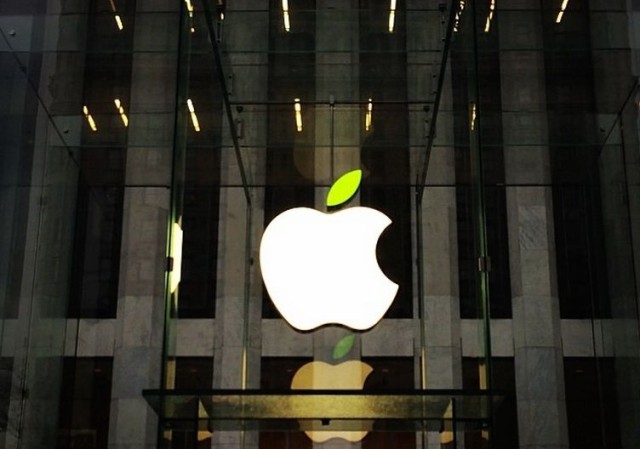
Apple traditionally celebrates Earth Day at its stores by adding a green leaf to its usually all-white logo.


Earth Day isn’t until April 22nd, but stores will be switching to the green uniforms two days early. That might be a bit confusing for fans of the green celebrating national weed day on 4/20.


By giving stores a does of green, Apple hopes to highlight its efforts in renewable energy, recycling, forest preservation and other areas of conversation. During the past year Apple has made a big push to switch to 100% renewable energy. The company claims that 96% of all of its energy now comes from renewable sources.


Apple fans in San Francisco can get in on the Earth love a day early. Former U.S. Vice President Al Gore is set to make an appearance at the Union Square Apple store tomorrow with Apple VP Lisa Jackson. The two will discuss climate change and other issues facing the Earth.


Source: cult of mac

Windows
Mac OS
iOS
Linux
3uTools
Win 64-bit For this device
V9.0 2025-11-11
Download
Win 32-bit For this device
V9.0 2025-11-11
Download
3uTools
Intel Chip How to Identify Chip Type
V9.0 2025-12-02
Download
Apple Silicon
V9.0 2025-12-02
Download
How to Identify Chip Type
1.  Click the Apple icon in the top-left corner of the screen and select About This Mac.
2.  Check the Processor or Chip field to determine if it is "Intel" or "Apple".
Please use the 3uTools PC client to install the iOS client:
1、 Install either the Windows or Mac version of 3uTools on your computer
2、 Open the PC client and connect your device to the computer via USB cable
3、 After the connection is successful, wait for the computer to automatically install the mobile app for the device, or locate “Install Mobile App” on the computer and manually click to install.
3uTools
deb file
V3.01 2025-11-20
Download
rpm file
V3.01 2025-11-20
Download
Windows
Windows
iOS
iOS
Android
Android
TV
TV
3uAirPlayer
Win 64-bit For this device
V6.0.2 2025-11-19
Download
Win 32-bit For this device
V6.0.2 2025-11-19
Download
iOS Device Mirroring (No App Required)
1、 Install 3uAirPlayer on the Windows PC
2、 Open Control Center and select Screen Mirroring
3、 From the list, choose your PC to start mirroring
4、 Or connect your iOS device to the PC via USB to begin mirroring
Scan to get "3uAirPlayer" App
3uAirPlayer TV V1.0.18
2025-11-28
TV System Requirements: Android 7.0 or later
Download the TV installation package, copy it to a USB drive, insert it into your TV or set-top box, then select the file from the home screen to install.