 NEWS
NEWS
New, Better iOS 10.2 Jailbreak Coming?
 03/20/2017
 4633
4633
There is some potentially good news for jailbreakers. The jailbreaking world has been a little frustrating recently, with neither Pangu or TaiG jailbreaking teams releasing tools for current, signable versions of iOS since July 2016 when the excellent iOS 9.2-9.3.3 tool was released by Pangu. @qwertyoruiopz aka Luca Todesco has been the only one to venture significantly into iOS 10 territory, but it's been a tricky process.
So tricky in fact that I know plenty of people that stuck with their old 9.3.3 Pangu jailbreaks just to be on the safe side, not to mention that Luca's jailbreak has usually left some models of iOS devices out in the cold. The iPhone 7 and iPhone 7 Plus are still not compatible with the iOS 10.2 jailbreak and the current tool is also considered a beta. It's also semi-untethered in nature - you'll have to re-jailbreak every time your device restarts, be it manually or from a dead battery.
Another hurdle is that while re-jailbreaking is fairly easy, and just requires you to run an app, if you do this after 7 days from the previous jailbreak process, you'll have to re-sign the app as well as re-jailbreak, which is a pain, and a huge amount less convenient than a fully untethered jailbreak. However, even the Pangu 9.2-9.3.3 tool was semi-tethered, which does point to worrying times for jailbreaking.
The potential answer comes from Luca himself:
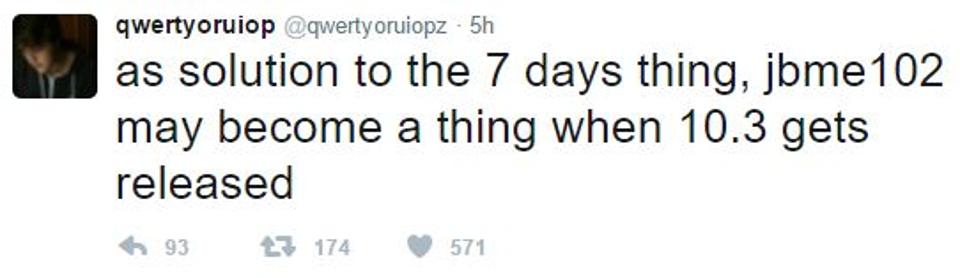
He will apparently consider releasing a browser-based/JailbreakMe tool that hopefully not only eliminates the need for a complicated install process, but according to Luca, the jailbreak could kill the need to re-sign after 7 days if your device reboots for whatever reason - for me, it's usually been a dead battery, and we have Apple to thank for that.
This raises two important questions. Firstly, what should do about upgrading iOS versions? Well, if you decided to stick on iOS 10.2 in case the jailbreak moved out of beta, then you'll be able to use the tool if it's released, so long as you have a compatible device. If you upgraded to iOS 10.2.1 then there's no way to downgrade.
The fact that Luca mentioned iOS 10.3 in the tweet is interesting. It could mean he's simply waiting till that time to launch the tool so he can finish it. Or, it could mean that he's waiting to see if Apple patches an exploit he's planning to use, which could hint at a possible iOS 10.3 jailbreak. The former is the most likely, sadly, so if you are on iOS 10.2, stay there for now until we here more.
Source: Forbes










