 NEWS
NEWS
Four New iPad Models Spotted In Analytics, iPad Pro Devices In Testing
 03/14/2017
 3523
3523
Analytics firm Fiksu is today reporting that they have seen four new iPad device identifiers appear in their logs. These as-yet-unannounced iPads were used to test a range of popular applications around Cupertino, running the latest iOS 10.3 beta and early builds of iOS 11.

It is likely that these model identifiers represent the rumored new iPad Pro models, with reports indicating that successors to the 9.7 inch and 12.9 inch iPad Pro could launch soon …
he four new devices found have the following model identifiers: iPad 7,1; iPad 7,2; iPad 7,3 and iPad 7,4. Although Fiksu only picked up about 40 devices, the company says that this is about the number of devices it expects to see a month before Apple launches a new product. This would suggest the new iPads are coming very soon.
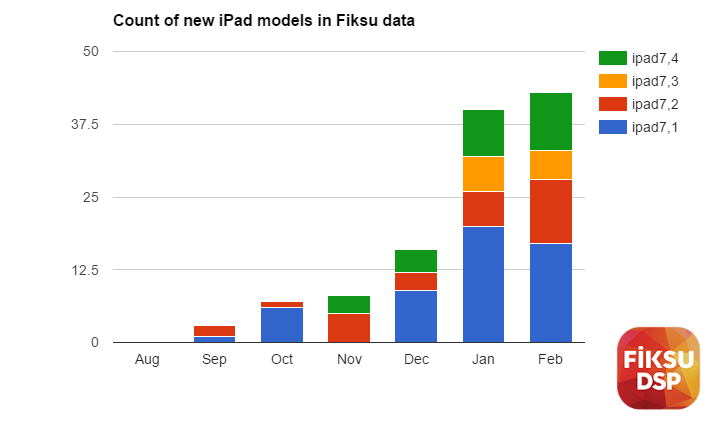
The firm gathers its data from app developers including its analytics SDK in their apps, which are then distributed to the App Store and collect information about users. The current iPad Pro devices on the market have ‘iPad 6,x’ identifiers so it seems like these unannounced products are new versions of that line.
KGI said that Apple was readying a radical new form-factor 10.5 inch iPad for 2017, with a virtual Home Button and edge-to-edge display. The release date for this product is even more unknown. One supply chain report indicated that the new iPads will not be available until May or June.
The idea of a cheaper ‘budget’ 9.7 inch iPad is also on the table; this could be in addition to or instead of a new 9.7 inch iPad Pro.
As some of the iPads were spotted running iOS 10.3 and some were running iOS 11, it makes sense that they aren’t going to launch at the same time. iOS 10.3 is expected to be available publicly in the next month or so, whereas iOS 11 isn’t shipping until September in the best case.
Source: 9to5mac










