 NEWS
NEWS
iOS 27's New AI Voice Control Feature Hints at Major Siri Upgrade Coming Soon
 05/21/2026
 1901
1901
Every May, Apple previews new accessibility features coming to devices like the iPhone, iPad, and Mac. The announcement typically occurs a few days before Global Accessibility Awareness Day, and it offers a glimpse into what will be included in the next major releases of Apple's software platforms, such as iOS, iPadOS, and macOS.
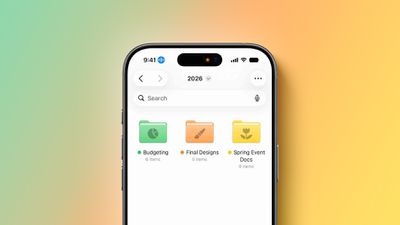
This year, one of the new capabilities shown off by Apple is natural language support for the Voice Control feature on the iPhone and iPad.
Voice Control is receiving an Apple Intelligence upgrade that will make the feature "more intuitive than ever," according to Apple. Specifically, iPhone and iPad users will be able to describe on-screen buttons and controls with natural language, instead of having to remember exact labels, numbers, or descriptions like before.
For example, users will be able to say things like "tap the guide about best restaurants" in Apple Maps or "tap the purple folder" in the Files app.
Voice Control powered by Apple Intelligence will initially be available in English in the U.S., Canada, the UK, and Australia, according to Apple.
AI-powered Voice Control hints at the more personalized version of Siri that Apple first announced all the way back at WWDC 2024. At the time, Apple said Siri would gain on-screen awareness, which would essentially turn the assistant into an AI agent that is capable of understanding natural language and taking action for you.
Correct me if I'm wrong but it sure looks like Apple just casually dropped agentic AI being built into iPhone Yes, in this video it's being used for Voice Control, but if a person can control their iPhone with natural language so can an AI agent! pic.twitter.com/S6DQOiQGsO — Dylan (@DylanMcD8) May 19, 2026
Apple's own example was an iPhone user asking Siri about their mother's flight and lunch reservation plans based on info retrieved from the Mail and Messages apps, and it was later reported that Siri will be able to do things such as comment on an Instagram post, or scroll through a shopping app and add something to your cart.
Overall, the revamped Siri is expected to have a better understanding of a user's personal context, on-screen awareness, and deeper per-app controls. In March 2025, Apple announced that these capabilities were delayed until later this year. The new-and-improved Siri is expected to be a tentpole feature of iOS 27, iPadOS 27, and macOS 27, which will be unveiled on June 8 and should be released to the public in September.
The more personalized Siri will likely require an iPhone 15 Pro or newer, a Mac with an M1 chip or newer, or an iPad with an A17 Pro or M1 chip or newer.
Source: Macrumors










