 NEWS
NEWS
Apple Invites for iPhone adds 7 new features, including an iMessage app
 04/24/2026
 2360
2360
Apple Invites has its second new version in as many months, adding seven new features. One key highlight is an iMessage app for sharing invitations without leaving the Messages app.
Apple Invites now includes an iMessage app
Apple Invites version 1.8 arrives today as the April upgrade to Apple’s digital invitation service for iCloud+ subscribers.
The new version includes seven new features, including changes around Image Playground and Apple Music.
Here’s the full list from today’s release:
- Image Playground themes are now available in the backgrounds gallery, helping you easily generate an original image to match the vibe of your event.
- Hosts can now manually edit the guest list to update guest responses and adjust the number of additional guests.
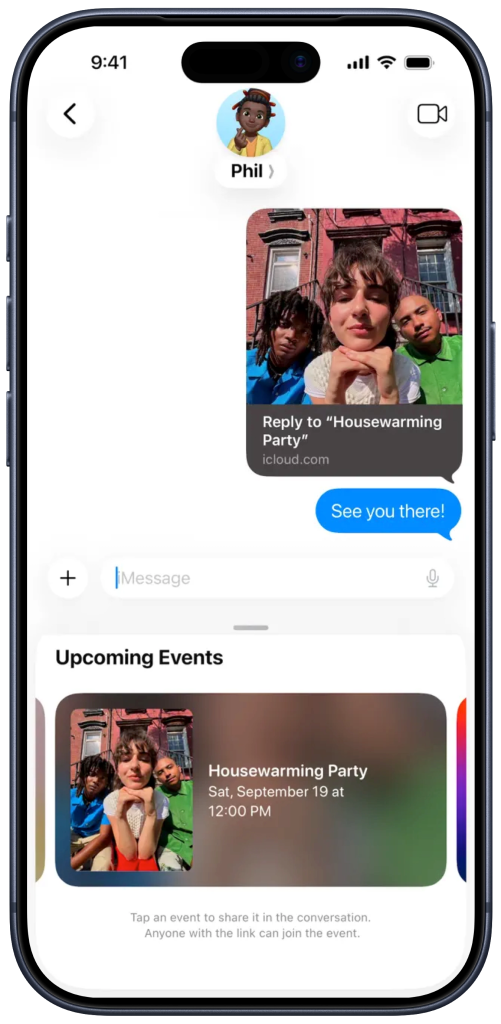
- A new Invites iMessage app lets you quickly share an existing invite without leaving Messages.
- A new All Events view in the dashboard helps you easily navigate both your upcoming and past events in one place.
- Hosts can now share or download an image of their invite card for easier sharing on social media.
- The Apple Music Shared Playlist tile now offers personalized playlist suggestions based on your listening history, along with even more searchable playlists to help you set the perfect soundtrack for your event.
- Hosts can now specify the timezone for their event to ensure all guests know when to arrive.
Here’s how the new iMessage app for Apple Invites looks:
Apple also says the new version of Apple Invites includes the usual bug fixes and performance improvements.
Apple Invites arrived as an iCloud+ feature in February 2025. A year later, the electronic invitation app is still iPhone-only, although it has received several feature improvements and content refreshes.
Back in March, Apple Invites was updated with the ability to countdown to the next event from the app’s widget — not just a specific event.
Source: 9to5mac










