NEWS

Apple Confirms Google Gemini Will Power Next-Generation Siri This Year

01/13/2026

79

Apple Confirms Google Gemini Will Power Next-Generation Siri This Year


In a statement shared with CNBC today, Apple confirmed that Google Gemini will power the next-generation version of Siri that is slated to launch later this year.


"After careful evaluation, we determined that Google's technology provides the most capable foundation for Apple Foundation Models and we're excited about the innovative new experiences it will unlock for our users," the statement said.


The report explicitly mentioned that Google Gemini will power Siri, as was expected. Apple's decision to lean on Google's artificial intelligence technology should result in the revamped Siri being more capable and advanced than it otherwise would have been, as Gemini's large language model is significantly larger than Apple's own model.


The next-generation version of Siri is expected to be introduced with iOS 26.4, which will likely be released to the general public in March or April.


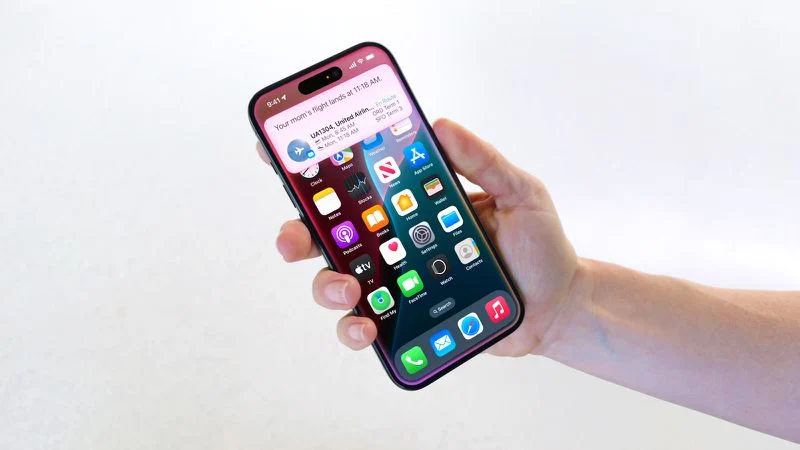
Apple first announced the personalized Siri features during its WWDC 2024 keynote, but last year it announced that they were delayed. The new capabilities will include better understanding of a user's personal context, on-screen awareness, and deeper per-app controls. For example, Apple showed an iPhone user asking Siri about their mother's flight and lunch reservation plans based on info from the Mail and Messages apps.


Update: Apple and Google today announced that Gemini will help power not only a more personalized version of Siri, but a range of future Apple Intelligence features.


Source: Macrumors

Windows
Mac OS
iOS
Linux
3uTools
Win 64-bit For this device
V9.01 2025-12-27
Download
Win 32-bit For this device
V9.01 2025-12-27
Download
3uTools
Intel Chip How to Identify Chip Type
V9.01 2025-12-31
Download
Apple Silicon
V9.01 2025-12-31
Download
How to Identify Chip Type
1.  Click the Apple icon in the top-left corner of the screen and select About This Mac.
2.  Check the Processor or Chip field to determine if it is "Intel" or "Apple".
Please use the 3uTools PC client to install the iOS client:
1、 Install either the Windows or Mac version of 3uTools on your computer
2、 Open the PC client and connect your device to the computer via USB cable
3、 After the connection is successful, wait for the computer to automatically install the mobile app for the device, or locate “Install Mobile App” on the computer and manually click to install.
3uTools
deb file
V3.01 2025-11-20
Download
rpm file
V3.01 2025-11-20
Download
Windows
Windows
iOS
iOS
Android
Android
TV
TV
3uAirPlayer
Win 64-bit For this device
V6.0.2 2025-11-19
Download
Win 32-bit For this device
V6.0.2 2025-11-19
Download
iOS Device Mirroring (No App Required)
1、 Install 3uAirPlayer on the Windows PC
2、 Open Control Center and select Screen Mirroring
3、 From the list, choose your PC to start mirroring
4、 Or connect your iOS device to the PC via USB to begin mirroring
Scan to get "3uAirPlayer" App
3uAirPlayer TV V1.0.18
2025-11-28
TV System Requirements: Android 7.0 or later
Download the TV installation package, copy it to a USB drive, insert it into your TV or set-top box, then select the file from the home screen to install.