
NEWS

The iPhone of Your Dreams is Reportedly Less Than Two Years Away

12/18/2025

390

In line with previous rumors, The Information today reported that Apple is planning to release a special 20th-anniversary iPhone less than two years from now.
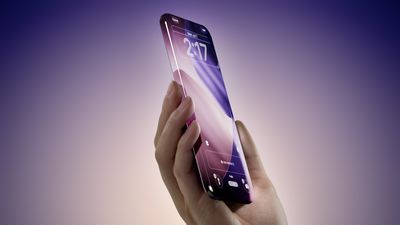
The iPhone of Your Dreams is Reportedly Less Than Two Years Away
The report said the device will have a seamless design, with a curved glass enclosure and no cutouts in the display. Apple is expected to move Face ID under the screen starting with the iPhone 18 Pro models next year, and the report said the 20th-anniversary iPhone will also feature an under-screen front camera.

The publication said it could not yet learn if the display itself will curve around the edges, as shown in our conceptual mockup above. Nevertheless, it appears that Apple is working on a very ambitious design for the 20th-anniversary iPhone, much like the iPhone X was a game-changer for the iPhone's 10th-anniversary.

At a minimum, the report said the 20th-anniversary iPhone will lack bezels around the screen for a true edge-to-edge experience. It said the device has only a "narrow metal band running around the midpoint of the device's edge, where the buttons sit."

Many of these details were previously reported by Bloomberg's Mark Gurman.

Apple is expected to release the 20th-anniversary iPhone around September 2027, so it is still early, and the device's design could change. If these rumors pan out, though, the 20th-anniversary iPhone could be something out of a dream.

Source: Macrumors

Windows
Mac OS
iOS
Linux
3uTools
Win 64-bit For this device
V9.0 2025-11-11
Download
Win 32-bit For this device
V9.0 2025-11-11
Download
3uTools
Intel Chip How to Identify Chip Type
V9.0 2025-12-02
Download
Apple Silicon
V9.0 2025-12-02
Download
How to Identify Chip Type
1.  Click the Apple icon in the top-left corner of the screen and select About This Mac.
2.  Check the Processor or Chip field to determine if it is "Intel" or "Apple".
Please use the 3uTools PC client to install the iOS client:
1、 Install either the Windows or Mac version of 3uTools on your computer
2、 Open the PC client and connect your device to the computer via USB cable
3、 After the connection is successful, wait for the computer to automatically install the mobile app for the device, or locate “Install Mobile App” on the computer and manually click to install.
3uTools
deb file
V3.01 2025-11-20
Download
rpm file
V3.01 2025-11-20
Download
Windows
Windows
iOS
iOS
Android
Android
TV
TV
3uAirPlayer
Win 64-bit For this device
V6.0.2 2025-11-19
Download
Win 32-bit For this device
V6.0.2 2025-11-19
Download
iOS Device Mirroring (No App Required)
1、 Install 3uAirPlayer on the Windows PC
2、 Open Control Center and select Screen Mirroring
3、 From the list, choose your PC to start mirroring
4、 Or connect your iOS device to the PC via USB to begin mirroring
Scan to get "3uAirPlayer" App
3uAirPlayer TV V1.0.18
2025-11-28
TV System Requirements: Android 7.0 or later
Download the TV installation package, copy it to a USB drive, insert it into your TV or set-top box, then select the file from the home screen to install.




