 NEWS
NEWS
Apple Invents An Infrared Reflective Layer To Keep Case & Display Cooler In Sunlight
 02/27/2017
 3389
3389
Today the US Patent & Trademark Office published a patent application from Apple that reveals yet another kind of transparent layer to be applied to both the display and the iPhone casing to help keep them cooler when out in sunlight.
Apple's proposed solution involves a transparent infrared reflective layer or coating that may be applied to one or more surfaces of an electronic device. For example, the infrared reflective layer may be applied to any surface of the electronic device to help prevent the electronic device from absorbing thermal radiation or heat from infrared light.
A method for coating a component of an electronic device with an infrared reflective layer is also discussed in Apple's patent filing. According to this method, a group of polymeric structures is suspended in a liquid. Each polymeric structure in the group of polymeric structures has a defined inner diameter and a defined outer diameter. The liquid containing the polymeric structures is applied to a surface of the component. Once the liquid is applied to the component, the liquid is evaporated thereby creating an infrared reflective layer or coating on the surface of the component of the electronic device.
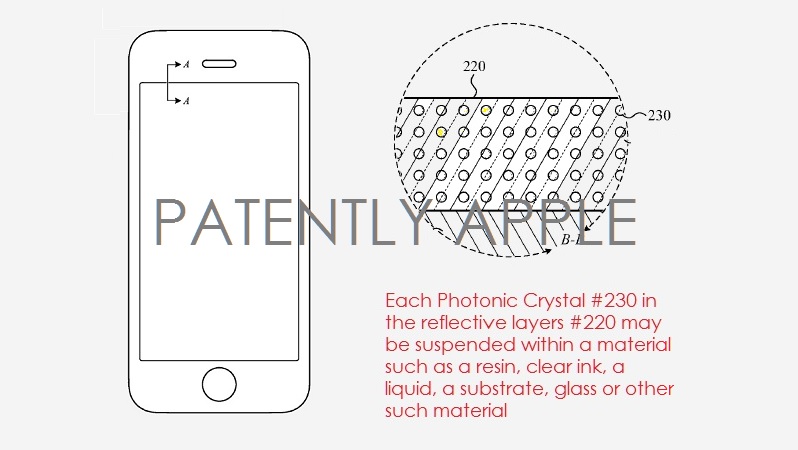
For example, in some implementations, the photonic crystals are arranged in a three-dimensional array or cubic lattice. The periodic nature of the array or the lattice affects the amount of infrared light that is reflected. Thus, the better the alignment of the photonic crystals within the infrared reflective layer, the more effective the infrared reflective layer will be.
Lastly, Apple notes that although an iPhone is displayed in the patent filing, the infrared reflective layer described may be used in a variety of electronic devices including, but not limited to, iPads, MacBooks, Apple Watch and other wearables.
Apple's patent application 20170052292 was filed back in Q3 2015. Considering that this is a patent application, the timing of such a product to market is unknown at this time.
Source: patenlyapple










