
NEWS

Apple Tops 'World's Most Admired Companies' List for Tenth Year in a Row

02/17/2017

3522

Apple has been awarded the number one spot on Fortune's annual list of the "World's Most Admired Companies." The 2017 list marks Apple's tenth consecutive win as the most admired company in the world according to Fortune, which collected the data from 3,800 executives, analysts, directors, and industry experts to end up with the final ranking. 


After Apple, the top five slots are rounded out by Amazon, Starbucks, Berkshire Hathaway, and Disney. Last year, Alphabet ranked in second place but the company has fallen down to sixth in 2017. One of Apple's direct rivals in the hardware and software space, Microsoft, has been placed in the ninth spot in a tie with Facebook. 
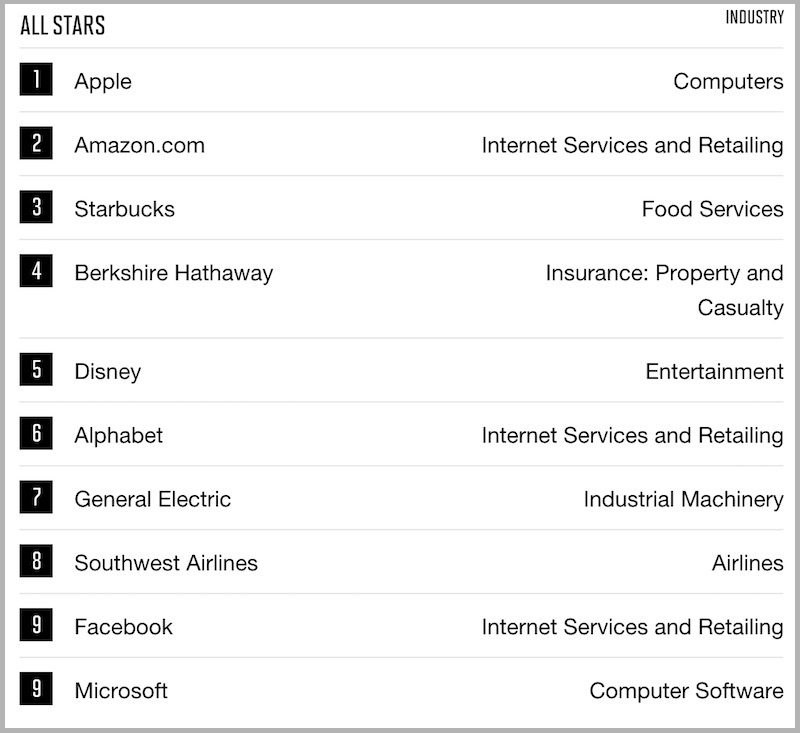

Apple Tops 'World's Most Admired Companies' List for Tenth Year in a Row


Fortune ranks companies through a collection of "key attributes of reputation," including areas like innovation, people management, social responsibility, and quality of products/services. This year, however, Apple's industry rank wasn't reported "due to an insufficient response rate in the computer industry." 

Like in previous iterations, Fortune started the list by looking at a collection of the 1,000 largest U.S. companies ranked by revenue, along with 500 non-U.S. companies with revenue of $10 billion or more. The list was then further whittled down to 680 companies in 28 countries, and Fortune survey collaborator Korn Ferry Hay Group began asking the 3,800 experts to rank companies on the nine criteria.


Source: Macrumors

Windows
Mac OS
iOS
Linux
3uTools
Win 64-bit For this device
V9.0 2025-11-11
Download
Win 32-bit For this device
V9.0 2025-11-11
Download
3uTools
Intel Chip How to Identify Chip Type
V9.0 2025-12-02
Download
Apple Silicon
V9.0 2025-12-02
Download
How to Identify Chip Type
1.  Click the Apple icon in the top-left corner of the screen and select About This Mac.
2.  Check the Processor or Chip field to determine if it is "Intel" or "Apple".
Please use the 3uTools PC client to install the iOS client:
1、 Install either the Windows or Mac version of 3uTools on your computer
2、 Open the PC client and connect your device to the computer via USB cable
3、 After the connection is successful, wait for the computer to automatically install the mobile app for the device, or locate “Install Mobile App” on the computer and manually click to install.
3uTools
deb file
V3.01 2025-11-20
Download
rpm file
V3.01 2025-11-20
Download
Windows
Windows
iOS
iOS
Android
Android
TV
TV
3uAirPlayer
Win 64-bit For this device
V6.0.2 2025-11-19
Download
Win 32-bit For this device
V6.0.2 2025-11-19
Download
iOS Device Mirroring (No App Required)
1、 Install 3uAirPlayer on the Windows PC
2、 Open Control Center and select Screen Mirroring
3、 From the list, choose your PC to start mirroring
4、 Or connect your iOS device to the PC via USB to begin mirroring
Scan to get "3uAirPlayer" App
3uAirPlayer TV V1.0.18
2025-11-28
TV System Requirements: Android 7.0 or later
Download the TV installation package, copy it to a USB drive, insert it into your TV or set-top box, then select the file from the home screen to install.




