
NEWS

Apple Maps Now Available on the Web

07/25/2024

1367

Apple today announced that it has launched an Apple Maps on the web feature, which is available in a public beta capacity. Apple Maps for the web works in Safari and other web browsers, allowing users to get directions without having to open up the Maps app.
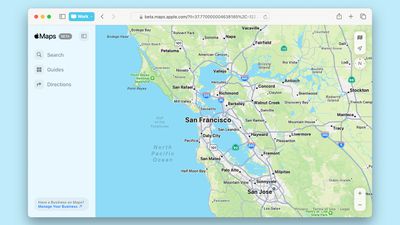
Apple Maps Now Available on the Web
‌Apple Maps‌ on the web works like the ‌Apple Maps‌ app, so users can get driving and walking directions, find places to visit, view ratings and hours, and browse curated Guides. There are also features for ordering food directly from the Maps place card and discovering places to eat, shop, and explore in cities around the world. Apple says that additional options like Look Around will be introduced in the coming months.

‌Apple Maps‌ on the web will serve as an alternative to Google Maps, which has long been the most popular web-based mapping option. You can check out ‌Apple Maps‌ on the web on Apple's Maps.Apple.com website. Developers are able to link out to Maps on the web in their apps, so users can get driving directions and see location information.

Maps on the web is available in English at the current time, and it works with Safari and Chrome on Mac and iPad, and Chrome and Edge on Windows PCs. Apple plans to add support for additional languages, browsers, and platforms over time.


Source: Macrumors

Windows
Mac OS
iOS
Linux
3uTools
Win 64-bit For this device
V9.0 2025-11-11
Download
Win 32-bit For this device
V9.0 2025-11-11
Download
3uTools
Intel Chip How to Identify Chip Type
V9.0 2025-12-02
Download
Apple Silicon
V9.0 2025-12-02
Download
How to Identify Chip Type
1.  Click the Apple icon in the top-left corner of the screen and select About This Mac.
2.  Check the Processor or Chip field to determine if it is "Intel" or "Apple".
Please use the 3uTools PC client to install the iOS client:
1、 Install either the Windows or Mac version of 3uTools on your computer
2、 Open the PC client and connect your device to the computer via USB cable
3、 After the connection is successful, wait for the computer to automatically install the mobile app for the device, or locate “Install Mobile App” on the computer and manually click to install.
3uTools
deb file
V3.01 2025-11-20
Download
rpm file
V3.01 2025-11-20
Download
Windows
Windows
iOS
iOS
Android
Android
TV
TV
3uAirPlayer
Win 64-bit For this device
V6.0.2 2025-11-19
Download
Win 32-bit For this device
V6.0.2 2025-11-19
Download
iOS Device Mirroring (No App Required)
1、 Install 3uAirPlayer on the Windows PC
2、 Open Control Center and select Screen Mirroring
3、 From the list, choose your PC to start mirroring
4、 Or connect your iOS device to the PC via USB to begin mirroring
Scan to get "3uAirPlayer" App
3uAirPlayer TV V1.0.18
2025-11-28
TV System Requirements: Android 7.0 or later
Download the TV installation package, copy it to a USB drive, insert it into your TV or set-top box, then select the file from the home screen to install.




