
NEWS

New MacBook Pro Models Include HDMI 2.0 Port Instead of HDMI 2.1

10/19/2021

3320

Apple in 2016 removed all of the ports from its MacBook Pro models except for Thunderbolt ports, a design that persisted for years -- until today. The newly announced 2021 MacBook Pro models include an SD card slot and an HDMI port alongside three Thunderbolt ports.
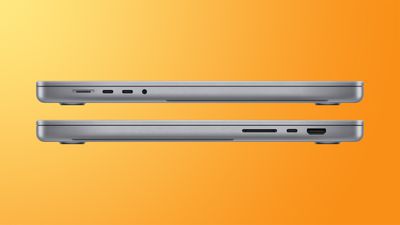

New MacBook Pro Models Include HDMI 2.0 Port Instead of HDMI 2.1


As noted in Apple's technical specifications for the new machine, the HDMI port is unfortunately not top of the line -- it is an HDMI 2.0 port instead of an HDMI 2.1 port.


The HDMI 2.0 port supports a single 4K display with a resolution of up to 60Hz. HDMI 2.1 technology would have allowed the port to run a 4K display with a 120Hz refresh rate.


It's curious that Apple did not include HDMI 2.1 in the MacBook Pro models because the Apple TV 4K that was released earlier this year does have an HDMI 2.1 port.


HDMI port is only HDMI 2.0, exactly why I’d much rather have had another T4 port, what a waste. pic.twitter.com/zzUXwfGoO8 — Paul Haddad (@tapbot_paul) October 18, 2021


With the Thunderbolt 4 ports, the M1 Pro MacBook Pro models overall support up to two external displays with up to 6K resolution at 60Hz. The ‌M1‌ Max MacBook Pro models support up to three external displays with up to 6K resolution and one external display with up to 4K resolution at 60Hz.


Source: Macrumors

Windows
Mac OS
iOS
Linux
3uTools
Win 64-bit For this device
V9.01 2025-12-27
Download
Win 32-bit For this device
V9.01 2025-12-27
Download
3uTools
Intel Chip How to Identify Chip Type
V9.01 2025-12-31
Download
Apple Silicon
V9.01 2025-12-31
Download
How to Identify Chip Type
1.  Click the Apple icon in the top-left corner of the screen and select About This Mac.
2.  Check the Processor or Chip field to determine if it is "Intel" or "Apple".
Please use the 3uTools PC client to install the iOS client:
1、 Install either the Windows or Mac version of 3uTools on your computer
2、 Open the PC client and connect your device to the computer via USB cable
3、 After the connection is successful, wait for the computer to automatically install the mobile app for the device, or locate “Install Mobile App” on the computer and manually click to install.
3uTools
deb file
V3.01 2025-11-20
Download
rpm file
V3.01 2025-11-20
Download
Windows
Windows
iOS
iOS
Android
Android
TV
TV
3uAirPlayer
Win 64-bit For this device
V6.0.2 2025-11-19
Download
Win 32-bit For this device
V6.0.2 2025-11-19
Download
iOS Device Mirroring (No App Required)
1、 Install 3uAirPlayer on the Windows PC
2、 Open Control Center and select Screen Mirroring
3、 From the list, choose your PC to start mirroring
4、 Or connect your iOS device to the PC via USB to begin mirroring
Scan to get "3uAirPlayer" App
3uAirPlayer TV V1.0.18
2025-11-28
TV System Requirements: Android 7.0 or later
Download the TV installation package, copy it to a USB drive, insert it into your TV or set-top box, then select the file from the home screen to install.




