
NEWS

Apple Announces 2025 Pride Band, Watch Face, and iPhone Wallpaper

05/06/2025

1543

Apple today announced its 2025 Pride Collection, including a new Apple Watch band, watch face, and a matching wallpaper for the iPhone and iPad.
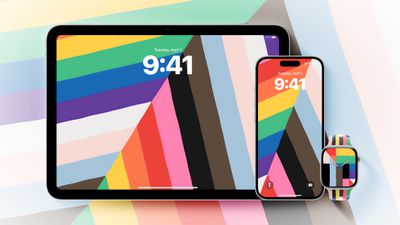
Apple Announces 2025 Pride Band, Watch Face, and iPhone Wallpaper
Ahead of Pride Month in June, Apple says its Pride Collection celebrates the strength and beauty of LGBTQ+ communities around the world.

The new Pride Edition Sport Band is now available to order on Apple.com and in the Apple Store app in 40mm, 42mm, and 46mm sizes, and it will be available at Apple Store locations starting next week. In the U.S., the band costs $49.

A matching Pride Harmony watch face features rainbow stripes that dynamically shift to form large hour numerals as users raise their wrist to check the time.

A matching iPhone and iPad wallpaper features colorful stripes that change position as users move, lock, or unlock their devices.

The watch face and wallpaper will be available in upcoming watchOS 11.5, iOS 18.5, and iPadOS 18.5 software updates, according to Apple. The watch face will be available through the Apple Watch and Apple Store apps, and on Apple.com.

Source: Macrumors

Windows
Mac OS
iOS
Linux
3uTools
Win 64-bit For this device
V9.0 2025-11-11
Download
Win 32-bit For this device
V9.0 2025-11-11
Download
3uTools
Intel Chip How to Identify Chip Type
V9.0 2025-12-02
Download
Apple Chip
V9.0 2025-12-02
Download
How to Identify Chip Type
1.  Click the Apple icon in the top-left corner of the screen and select About This Mac.
2.  Check the Processor or Chip field to determine if it is "Intel" or "Apple".
Please use the 3uTools PC client to install the iOS client:
1、 Install either the Windows or Mac version of 3uTools on your computer
2、 Open the PC client and connect your device to the computer via USB cable
3、 After the connection is successful, wait for the computer to automatically install the mobile app for the device, or locate “Install Mobile App” on the computer and manually click to install.
3uTools
deb file
V3.01 2025-11-20
Download
rpm file
V3.01 2025-11-20
Download
Windows
Windows
iOS
iOS
Android
Android
TV
TV
3uAirPlayer
Win 64-bit For this device
V6.0.2 2025-11-19
Download
Win 32-bit For this device
V6.0.2 2025-11-19
Download
iOS Device Mirroring (No App Required)
1、 Install 3uAirPlayer on the Windows PC
2、 Open Control Center and select Screen Mirroring
3、 From the list, choose your PC to start mirroring
4、 Or connect your iOS device to the PC via USB to begin mirroring
Scan to get "3uAirPlayer" App
3uAirPlayer TV V1.0.18
2025-11-28
TV System Requirements: Android 7.0 or later
Download the TV installation package, copy it to a USB drive, insert it into your TV or set-top box, then select the file from the home screen to install.




