
NEWS

Apple Watch's New Sleep Apnea Detection Feature Approved in Canada

09/29/2024

1701

Health Canada this week published approval of watchOS 11's sleep apnea detection feature on the Apple Watch Series 10, Apple Watch Series 9, and Apple Watch Ultra 2. The feature launched in the U.S. and over 150 other countries and regions earlier this month, and Apple is now permitted to make the feature available in Canada.
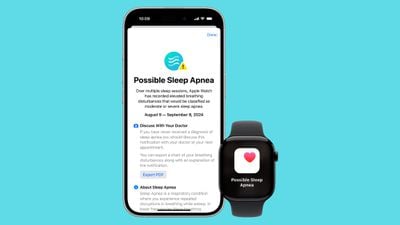
Apple Watch's New Sleep Apnea Detection Feature Approved in Canada
It is unclear when Apple will expand the feature to Canada.

Sleep apnea is a potentially serious disorder in which a person's breathing repeatedly stops and starts while they sleep. The detection feature uses the Apple Watch's accelerometer to "monitor small movements at the wrist that are associated with interruptions in normal respiratory patterns." If these disturbances occur frequently over multiple nights, they may be associated with sleep apnea, according to Apple.
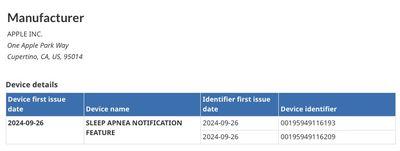
Apple Watch's New Sleep Apnea Detection Feature Approved in Canada
Apple says the feature was developed using "advanced machine learning" and an "extensive data set of clinical-grade sleep apnea tests," and then validated in a clinical study. The feature is intended to detect signs of moderate to severe sleep apnea in adults who have not already been diagnosed with the disorder, according to the company.

Apple Watch users can view their nightly Breathing Disturbances in the Health app on the iPhone, with disturbances classified as "elevated" or "not elevated."

Source: Macrumors

Windows
Mac OS
iOS
Linux
3uTools
Win 64-bit For this device
V9.0 2025-11-11
Download
Win 32-bit For this device
V9.0 2025-11-11
Download
3uTools
Intel Chip How to Identify Chip Type
V9.0 2025-12-02
Download
Apple Chip
V9.0 2025-12-02
Download
How to Identify Chip Type
1.  Click the Apple icon in the top-left corner of the screen and select About This Mac.
2.  Check the Processor or Chip field to determine if it is "Intel" or "Apple".
Please use the 3uTools PC client to install the iOS client:
1、 Install either the Windows or Mac version of 3uTools on your computer
2、 Open the PC client and connect your device to the computer via USB cable
3、 After the connection is successful, wait for the computer to automatically install the mobile app for the device, or locate “Install Mobile App” on the computer and manually click to install.
3uTools
deb file
V3.01 2025-11-20
Download
rpm file
V3.01 2025-11-20
Download
Windows
Windows
iOS
iOS
Android
Android
TV
TV
3uAirPlayer
Win 64-bit For this device
V6.0.2 2025-11-19
Download
Win 32-bit For this device
V6.0.2 2025-11-19
Download
iOS Device Mirroring (No App Required)
1、 Install 3uAirPlayer on the Windows PC
2、 Open Control Center and select Screen Mirroring
3、 From the list, choose your PC to start mirroring
4、 Or connect your iOS device to the PC via USB to begin mirroring
Scan to get "3uAirPlayer" App
3uAirPlayer TV V1.0.18
2025-11-28
TV System Requirements: Android 7.0 or later
Download the TV installation package, copy it to a USB drive, insert it into your TV or set-top box, then select the file from the home screen to install.




