 NEWS
NEWS
Apple Card Activation Video Discovered in Latest iOS 12.3 Beta
 04/09/2019
 4615
4615
Apple today released the first beta of iOS 12.3 for developers. As expected, the new release includes code to support some of the new services and features announced during the “It’s show time” event on Monday and we’ve discovered a look at how Apple’s upcoming credit card will be activated.
One of the new services announced at the event was the new Apple Card, a credit card designed by Apple for a healthier financial life. The card is integrated in the Wallet app and can be used anywhere Apple Pay is accepted, which gives the user 2% cash back with Daily Cash.
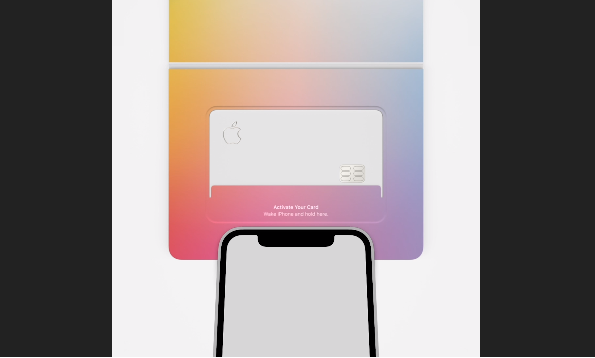
Not every merchant accepts Apple Pay though, so Apple is also introducing a physical version of the Apple Card. It is made of titanium and only shows the user’s name, the Apple logo, and includes the chip for it to be used with traditional POS devices.
Physical credit cards usually arrive locked, some require the user to use an app to unlock the card, others require the card owner to call the bank in order to unlock it. Since Apple Card only has a user’s name on it, no CVV, or number, Apple designed a brand new way to unlock the card.
Apple card will arrive in a colorful envelope with a little pocket for the card itself. Below the pocket is a glyph showing an iPhone inside a circle, just like the glyph that appears on iOS when scanning an NFC tag.
To unlock Apple Card, users will be asked to touch their iPhone to this glyph in the envelope – which is what contains the NFC tag. iOS will then display a user interface similar to the one used to pair AirPods, HomePod, and other devices. A simple button press will then do the process of activating the card with the user’s account.
This activation process is clearly not finished quite yet, but that’s to be expected given this is the first beta version of it. Another fact we learned from this first beta is that the Apple Card, like many other products and projects inside Apple, has a code name. The Apple Card project is called “Broadway” internally.
Here’s a video showing the process happening on iOS 12.3 beta 1:









