
NEWS

$249 iPhone SE Again Back in Stock on Apple's Clearance Site

02/15/2019

2443

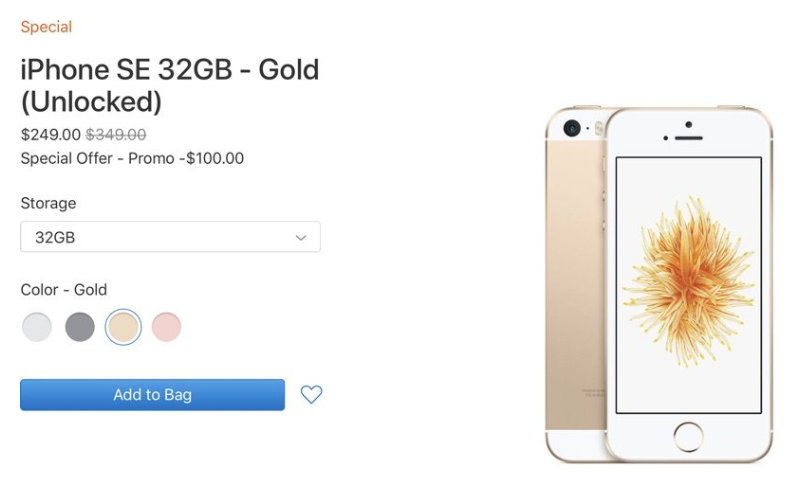
For those who have been unable to take advantage of the $249 iPhone SE deal on Apple's U.S. clearance site, Apple again has a limited supply of the discounted 4-inch devices. 


You can purchase the 32GB iPhone SE in gold for $249 or the 128GB iPhone SE in space gray or silver for $299. 

$249 iPhone SE Again Back in Stock on Apple's Clearance Site

Apple has been offering iPhone SE models on clearance since mid-January, but available stock often sells out quickly. Apple has done several restocks, however, giving those who prefer smaller devices one last chance to purchase a 4-inch iPhone on the cheap. 


Apple originally discontinued the iPhone SE in September 2018 when the iPhone XS, XS Max, and XR were announced. Apple's iPhone lineup now starts with the iPhone 7 and 7 Plus as its entry-level devices. 


The iPhone SE, first announced in March 2016, was the last 4-inch smartphone that Apple offered, with the 4.7-inch iPhone 7 and iPhone 8 models now the smallest that Apple officially sells in retail stores. 


With these clearance sales, Apple seems to be getting rid of the remaining iPhone SE stock, and it's clear that available supply is dwindling. There are just three iPhone SE models that can be purchased on the site now, while earlier stock updates had more options. 


Those who want to get an iPhone SE should do so soon because it's not clear how many more restocks Apple will be offering.


Source: appleinsider


Windows
Mac OS
iOS
Linux
3uTools
Win 64-bit For this device
V9.01 2025-12-27
Download
Win 32-bit For this device
V9.01 2025-12-27
Download
3uTools
Intel Chip How to Identify Chip Type
V9.01 2025-12-31
Download
Apple Silicon
V9.01 2025-12-31
Download
How to Identify Chip Type
1.  Click the Apple icon in the top-left corner of the screen and select About This Mac.
2.  Check the Processor or Chip field to determine if it is "Intel" or "Apple".
Please use the 3uTools PC client to install the iOS client:
1、 Install either the Windows or Mac version of 3uTools on your computer
2、 Open the PC client and connect your device to the computer via USB cable
3、 After the connection is successful, wait for the computer to automatically install the mobile app for the device, or locate “Install Mobile App” on the computer and manually click to install.
3uTools
deb file
V3.01 2025-11-20
Download
rpm file
V3.01 2025-11-20
Download
Windows
Windows
iOS
iOS
Android
Android
TV
TV
3uAirPlayer
Win 64-bit For this device
V6.0.2 2025-11-19
Download
Win 32-bit For this device
V6.0.2 2025-11-19
Download
iOS Device Mirroring (No App Required)
1、 Install 3uAirPlayer on the Windows PC
2、 Open Control Center and select Screen Mirroring
3、 From the list, choose your PC to start mirroring
4、 Or connect your iOS device to the PC via USB to begin mirroring
Scan to get "3uAirPlayer" App
3uAirPlayer TV V1.0.18
2025-11-28
TV System Requirements: Android 7.0 or later
Download the TV installation package, copy it to a USB drive, insert it into your TV or set-top box, then select the file from the home screen to install.




