NEWS

Apple Shares New Ad Highlighting Group FaceTime

11/30/2018

2435

Apple Shares New Ad Highlighting Group FaceTime


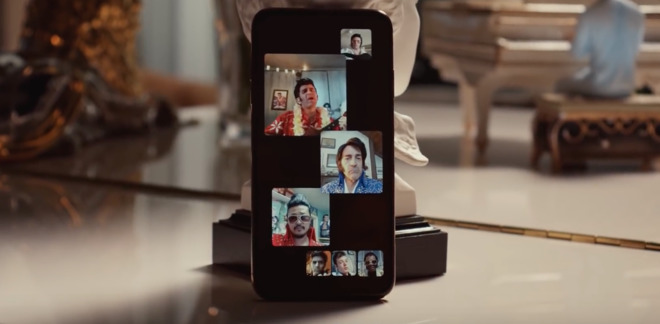
The latest advertisement was published on Thursday afternoon. The ad depicts Elvis Presley impersonators from around the world, all singing Elvis' "There's Always Me" to each other.


Using Apple's Group FaceTime, iPhone users can participate in video calls with up to 32 participants. A carousel along the bottom shows all participants, while those talking are brought into the majority of the screen. Individual windows can be brought full-screen as well.

Calls can be answered right on the Apple Watch, before jumping over to the video FaceTime call on an iPhone or iPad.

The feature is designed not just for iOS 12, but for macOS Mojave as well. The Mac version of FaceTime on Mojave lacks camera filters, video stickers and the face tracking Animoji and custom Memoji features available to iOS clients.


Source: appleinsider

Windows
Mac OS
iOS
Linux
3uTools
Win 64-bit For this device
V9.01 2025-12-27
Download
Win 32-bit For this device
V9.01 2025-12-27
Download
3uTools
Intel Chip How to Identify Chip Type
V9.01 2025-12-31
Download
Apple Silicon
V9.01 2025-12-31
Download
How to Identify Chip Type
1.  Click the Apple icon in the top-left corner of the screen and select About This Mac.
2.  Check the Processor or Chip field to determine if it is "Intel" or "Apple".
Please use the 3uTools PC client to install the iOS client:
1、 Install either the Windows or Mac version of 3uTools on your computer
2、 Open the PC client and connect your device to the computer via USB cable
3、 After the connection is successful, wait for the computer to automatically install the mobile app for the device, or locate “Install Mobile App” on the computer and manually click to install.
3uTools
deb file
V3.01 2025-11-20
Download
rpm file
V3.01 2025-11-20
Download
Windows
Windows
iOS
iOS
Android
Android
TV
TV
3uAirPlayer
Win 64-bit For this device
V6.0.2 2025-11-19
Download
Win 32-bit For this device
V6.0.2 2025-11-19
Download
iOS Device Mirroring (No App Required)
1、 Install 3uAirPlayer on the Windows PC
2、 Open Control Center and select Screen Mirroring
3、 From the list, choose your PC to start mirroring
4、 Or connect your iOS device to the PC via USB to begin mirroring
Scan to get "3uAirPlayer" App
3uAirPlayer TV V1.0.18
2025-11-28
TV System Requirements: Android 7.0 or later
Download the TV installation package, copy it to a USB drive, insert it into your TV or set-top box, then select the file from the home screen to install.