 NEWS
NEWS
iOS 12 Speeds up Even an Acient iPhone 5S, at Least in Beta
 07/02/2018
 2805
2805
It’s speed test time. This is what it’s like to run iOS 12 on the iPhone 5S.
The iOS 12 beta has a boatload of features to grab your attention: Memoji, group FaceTime calls and improved notifications.
But one of the most significant changes is performance gains under the hood, especially for older devices like the iPhone 5S.
Apple made some big claims during the WWDC keynote when iOS 12 was first unveiled. Using the example of an iPhone 6 Plus:
Apps launch up to 40 percent faster
Keyboard comes up 50 percent faster
Slide to take a photo is 70 percent faster
On paper, these appear to be big improvements. But the iPhone 6 Plus isn't even the oldest device that can run iOS 12. That's the iPhone 5S.
So to see how the newest iOS performs on the oldest phone, we took two 16GB iPhone 5S models and factory reset them. Then we replicated some examples from the keynote. One was running the iOS 12 public beta and the other iOS 11.4.
We don't claim this to be a scientific test, just an anecdotal account of how quickly the OS performed when performing real-world tasks. Bear in mind that iOS 12 is still in public beta and performance may change between now and the final release in the fall.
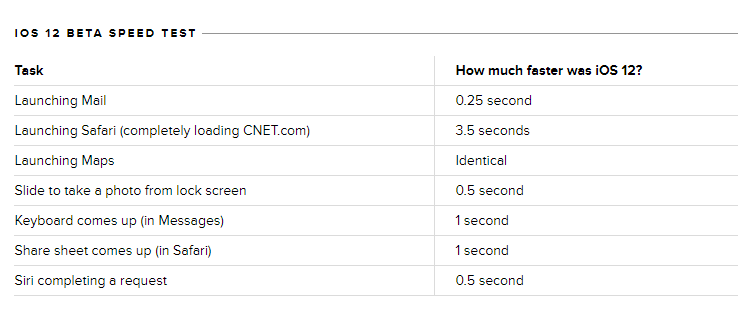
Launching apps like Safari and Mail were noticeably faster in the iOS 12 beta, but the difference in others, including Weather and Maps, was hardly visible.
Apple's claim during the keynote was that the share sheet comes up twice as fast when the system is under load. We found that the share sheet came up much faster than it did on iOS 11, even when there were no other apps open. However, this result wasn't always consistent -- after running it several times in a row, iOS 11.4 mostly caught up to the beta.
Startup time was the category where the iOS 12 beta clearly fell behind. iOS 11.4 loaded much faster and was ready to go 9 seconds before iOS 12.
Stay tuned for official performance testing once the final version of iOS 12 is released.
How to get iOS 12 right now in 3uTools?










