 NEWS
NEWS
Apple's Headphone Jack Adapter Remains a Top Seller at Best Buy
 06/28/2018
 2999
2999
Back in September 2016, controversy erupted when Apple released the iPhone 7 and iPhone 7 Plus without a headphone jack. Now, users must plug wired headphones into the Lightning connector using an adapter, included in the box with each device, and sold separately for $9 in the United States.
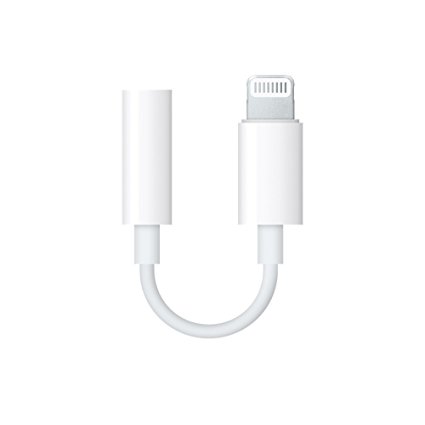
The adapter is also available at resellers such as Best Buy, where nearly two years later, it remains a top seller. In fact, the adapter is Best Buy's second-best selling Apple product in terms of unit sales, behind only AirPods, according to Joshua Fruhlinger, publisher of data-driven site Thinknum:
"The above chart shows the Lightning-to-3.5mm Headphone Adapter's sales rank at Best Buy for the past couple years. A lower sales rank, of course, is better. As you can see, the adapter has been a top-25 seller for the better part of the past year.
Apple is likely not making a ton off of the little dongles, but the fact remains that it's the company's second-best-selling product at America's number-one electronics retailer, ahead of its EarPods and Apple Watch.
Here is the data, obtained using Best Buy's developer APIs, and we did see that the headphone jack adapter has consistently ranked as the best selling Apple product behind AirPods, with a few days here and there as exceptions, for well over a year.
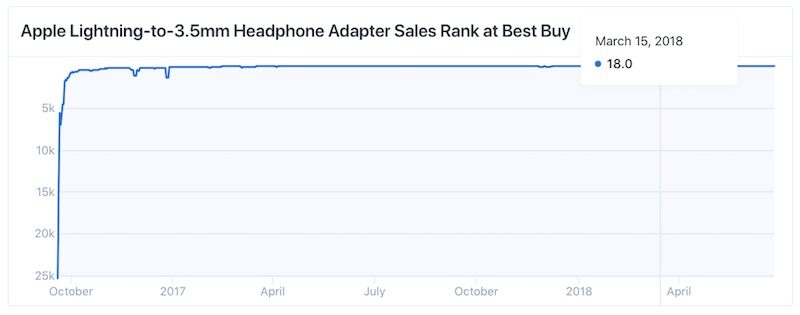
In fact, since the adapter was released a few years ago, its sales ranking among all products sold by Best Buy has generally increased:
Dec 15, 2016: 261st
Mar 15, 2017: 77th
Jun 15, 2017: 33rd
Sep 15, 2017: 30th
Dec 15, 2017: 53rd
Mar 15, 2018: 18th
Jun 15, 2018: 19th
The data is particularly interesting given that Apple already includes its headphone jack adapter in the box with its latest iPhones, so every customer that needs one should already have one. So, what is driving all of the sales?
Fruhlinger offered up a pretty reasonable explanation: people keep losing the adapter, thereby having to buy a new one:
"I almost died of laughter at the gym last year. I was plodding away on a treadmill listening to Bill Burr complain about his new iPhone. To be more precise, he was ranting about his new iPhone's lack of a headphone jack and how he kept losing those Lightning-to-3.5mm headphone adapters… "
"The story cut too close to home. As a wired headphone holdout (I refuse to charge my headphones, and I love my Klipsches), I've gone through several headphones adapters myself."
Of course, some customers may simply want more than one headphone jack adapter for use in the car, at work, and so forth.
Overall, the data suggests wired headphones remain popular, but remember that AirPods are the one Apple product outselling the adapter at Best Buy, so many customers are also embracing wireless.
Apple has said it is pushing towards a "truly wireless future," as evidenced by the removal of the headphone jack, and its other products and technologies, ranging from AirPods and AirPower to its W1 and W2 wireless chips. The headphone jack adapter has always been a stopgap amid that transition.
In fact, earlier this year, analysts at Barclays predicted that Apple won't include the adapter in the box with the trio of iPhones rumored to launch this September. Even if that turns out to be false, the adapter certainly won't be around forever. But, for now, it clearly remains quite popular.
Source: macrumors










