
NEWS

Apple Self-driving Test Cars Could Hit California Roads in April

02/24/2018

2625

If approved, new Californian regulations could allow companies like Apple to test their self-driving platforms with remote backup, instead of putting a human behind the wheel.
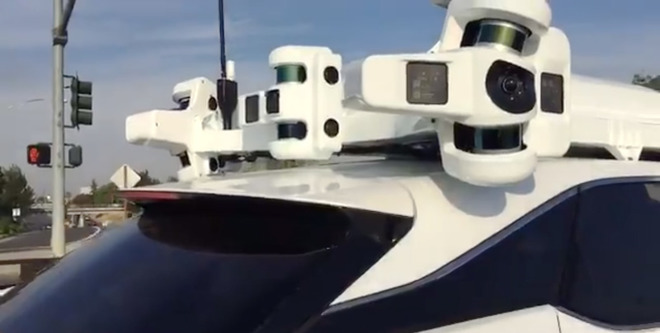

Apple Self-driving Test Cars Could Hit California Roads in April


The regulations are likely to be approved Feb. 26, and take effect after a month-long public notice period, Reuters reported on Friday. During that wait, companies wanting to take advantage would be able to submit applications.


In theory, a single remote operator could oversee several self-driving cars. That might make things much more cost-efficient for both small startups and large corporations, since companies would no longer have to divert engineers or other staff for ride-alongs.


The head of one startup, Zoox's Tim Kentley-Klay, noted that when self-driving vehicles become standard with ridehailing services, those companies will have to have some sort of remote control system in place anyway —whether to help customers or deal with technical problems.


Apple currently has at least 27 self-driving Lexus testbeds on California roads. That still puts it behind some rivals, such as Alphabet's Waymo, which has hundreds of vehicles in several states and is racing towards the goal of a commercial launch.


In fact Apple's ambitions in the autonomous space are still unclear. The company was at one point considering making its own electric car, but it has since refocused the project to develop a platform. It may be aiming at the ridehailing market, likely in partnership with one or more outside businesses.


Source: appleinsider


Windows
Mac OS
iOS
Linux
3uTools
Win 64-bit For this device
V9.01 2025-12-27
Download
Win 32-bit For this device
V9.01 2025-12-27
Download
3uTools
Intel Chip How to Identify Chip Type
V9.01 2025-12-31
Download
Apple Silicon
V9.01 2025-12-31
Download
How to Identify Chip Type
1.  Click the Apple icon in the top-left corner of the screen and select About This Mac.
2.  Check the Processor or Chip field to determine if it is "Intel" or "Apple".
Please use the 3uTools PC client to install the iOS client:
1、 Install either the Windows or Mac version of 3uTools on your computer
2、 Open the PC client and connect your device to the computer via USB cable
3、 After the connection is successful, wait for the computer to automatically install the mobile app for the device, or locate “Install Mobile App” on the computer and manually click to install.
3uTools
deb file
V3.01 2025-11-20
Download
rpm file
V3.01 2025-11-20
Download
Windows
Windows
iOS
iOS
Android
Android
TV
TV
3uAirPlayer
Win 64-bit For this device
V6.0.2 2025-11-19
Download
Win 32-bit For this device
V6.0.2 2025-11-19
Download
iOS Device Mirroring (No App Required)
1、 Install 3uAirPlayer on the Windows PC
2、 Open Control Center and select Screen Mirroring
3、 From the list, choose your PC to start mirroring
4、 Or connect your iOS device to the PC via USB to begin mirroring
Scan to get "3uAirPlayer" App
3uAirPlayer TV V1.0.18
2025-11-28
TV System Requirements: Android 7.0 or later
Download the TV installation package, copy it to a USB drive, insert it into your TV or set-top box, then select the file from the home screen to install.




