 NEWS
NEWS
HomePod at Launch Lacks Stereo linking and multiple-room support till 'later this year'
 01/24/2018
 3023
3023
Apple's HomePod may be shipping in the beginning of February, but multiple-room audio support and stereo sound between two HomePods will be absent at launch.
The features were spoken of during the tease of the HomePod at the 2017 WWDC. At the time, Apple said that it could be paired with another unit to deliver a wide stereo experience.
AppleInsider was able to use the HomePod during the 2017 WWDC, and was able to listen to a pair of HomePods paired for stereo. It is unclear why the feature is not included with the release of the device.
Multiple-room support appears to be a function of AirPlay 2 —so why it is not included with the HomePod isn't clear, unless Apple is expecting more delays in releasing the technology to users in iOS and macOS.
Apple notes that both features are coming "this year" in a software update. An update to which platform, be it the HomePod, iOS, macOS, or all three to enable the features wasn't made clear.
Also not clear is launch support for languages beyond English. Siri already has support for many languages, including French and German —languages in countries next on tap for HomePod availability.
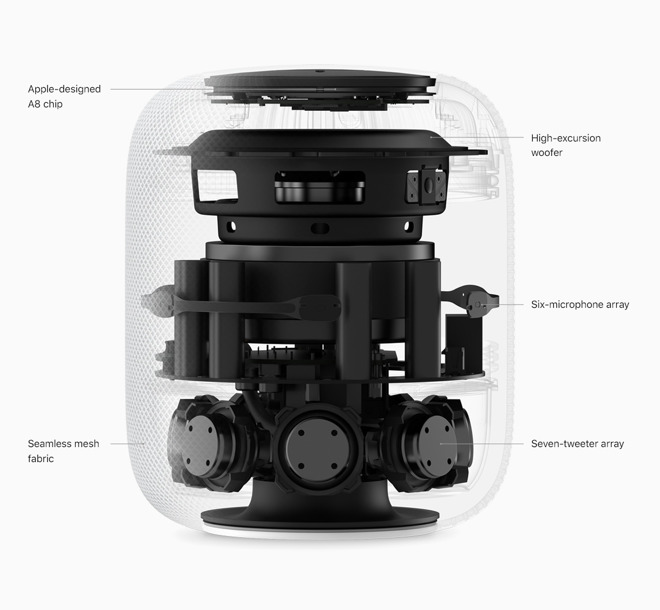
With a Mac Pro-like cylindrical design, the HomePod is under 7 inches tall in a 3D mesh acoustic fabric. In addition to the A8 chip, it has 7 tweeters and a dynamic modeling subwoofer.
As previously announced, the HomePod retails for $349 in white and space gray in the US, UK and Australia. It will be available in France and Germany later in the spring. The HomePod is compatible with iPhone 5s or later, iPad Pro, iPad Air or later, iPad mini 2 or later, or iPod touch (6th generation) with iOS 11.2.5 or later.
Source: appleinsider










