 NEWS
NEWS
New 'Pixelmator Pro' Photo Editing App for Mac Now Available
 11/30/2017
 3284
3284
The team behind the popular Pixelmator photo editing app for iOS and Mac today launched its latest Mac app, Pixelmator Pro. Pixelmator Pro is a more advanced version of its existing Pixelmator software, built from the ground up for the Mac.
First announced in September, Pixelmator Pro features a reimagined workflow with simplified editing tools, a single-window interface, and intelligent image editing features powered by machine learning. 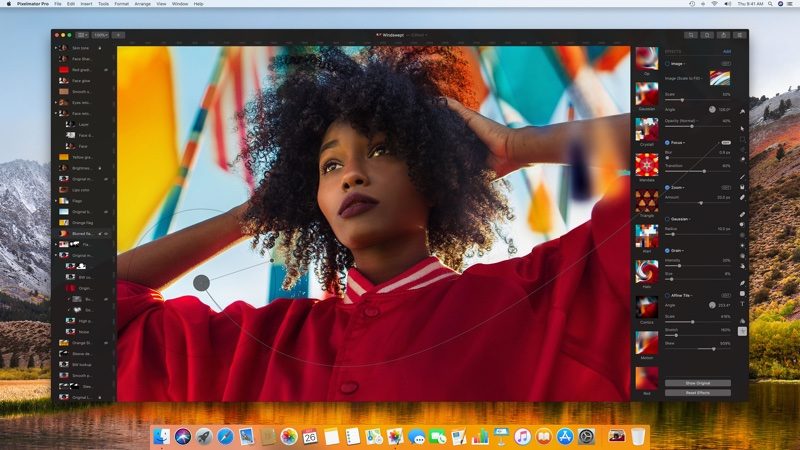
The software uses the Core ML framework built into macOS High Sierra to power features like automatic horizon detection, smarter quick selections, and better repair tools for removing unwanted objects from photos.
Non-destructive image editing is a key feature, and there are new tools for resizing and rearranging layers. New color adjustment tools and RAW support make it easy to quickly adjust photos, and there's an entirely new painting engine and dynamic paint blending technology powered by Metal 2, along with new brushes.
For those who are used to Pixelmator, the new Pixelmator Pro interface is quite a bit different and may take a bit of time to adjust to, but it is easier to locate tools, especially for new users.
The repair tool for editing objects out of a photo is much improved and eliminates objects much more seamlessly with just a few clicks, and tools for selectively adjusting color, brightness, sharpness, and other image aspects are more easily accessible.
Painting with the new painting tools is an entirely different experience thanks to the blending options, and there are a ton of new brushes and styles to experiment with. For photo editing, a new Recipes feature lets you build and save nondestructive effects.
It's much, much easier to work with multiple layers in the new version of Pixelmator using a new left-handed layer bar that allows layers to be quickly rearranged, resized, grouped, and more. There are also new guidelines for automatic spacing adjustments that are similar to what's available in Photoshop, and quick selection seems to be much improved.
Pixelmator Pro can be downloaded from the Mac App Store or from the Pixelmator website. On the Pixelmator website, users can get a free 30-day trial to test the app, which is priced at $59.
Source: macrumors










