 NEWS
NEWS
Apple Releases A macOS Security Update to Fix Huge Login Security Flaw
 11/30/2017
 3888
3888
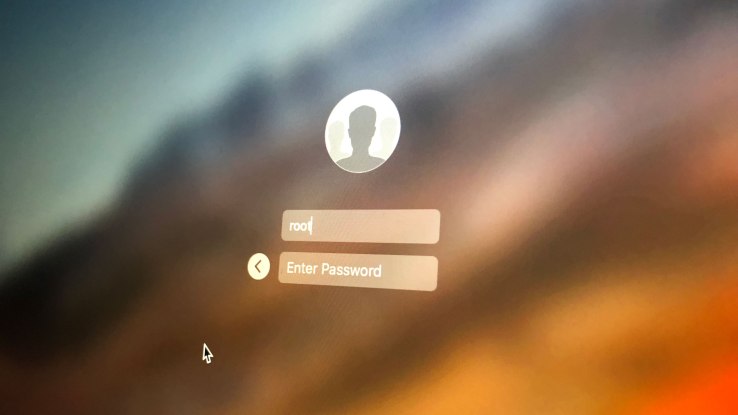
Apple has just released a security update for macOS High Sierra and you should update right now (Apple will automatically push the security patch later today). This update fixes yesterday’s very concerning vulnerability that let anyone log into your Mac without your password.
In order to install the update, open the Mac App Store and click on the “Updates” tab. Interestingly, the release notes say “install this update as soon as possible.” Apple has worked long hours to fix yesterday’s flaw as soon as possible. But it shouldn’t have happened in the first place.

The security flaw affected all Macs running the latest version of High Sierra (at least version 10.13.1 — 17B48). On the login screen or in the preference panel, you could bypass all security screens by entering the root username and no password. Multiple persons at TechCrunch tested the flaw and could replicate it effortlessly. After that, you can see everything on the computer even if it’s not yours. It even works with a screen sharing session. For hackers, it’s a great way to access your emails, personal data and more.

The patch release notes are quite short. “A logic error existed in the validation of credentials. This was addressed with improved credential validation,” Apple says.
Update: Apple will automatically roll out the update later today for everyone who is affected. Apple has provided the following statement:
“Security is a top priority for every Apple product, and regrettably we stumbled with this release of macOS.
When our security engineers became aware of the issue Tuesday afternoon, we immediately began working on an update that closes the security hole. This morning, as of 8:00 a.m., the update is available for download, and starting later today it will be automatically installed on all systems running the latest version (10.13.1) of macOS High Sierra.
We greatly regret this error and we apologize to all Mac users, both for releasing with this vulnerability and for the concern it has caused. Our customers deserve better. We are auditing our development processes to help prevent this from happening again.”
Source: techcrunch










