
NEWS

Apple’s Lisa-1 Goes for $50,300 At Technology Auction in Cologne, Germany

11/21/2017

3686

Of the two dozen collectable categories on offer at Auction Team Breker’s autumn extravaganza in Cologne, Germany, computing and calculation came out on top. The highest price of the day was a Apple’s Lisa-1 personal computer, which went for $50,300.


Released on Jan. 19, 1983, the Lisa wasn’t a commercial success. However, it can still claim a place in PC history for introducing the overlapping windows, pull-down menus and the recycle bin that we still rely on today.
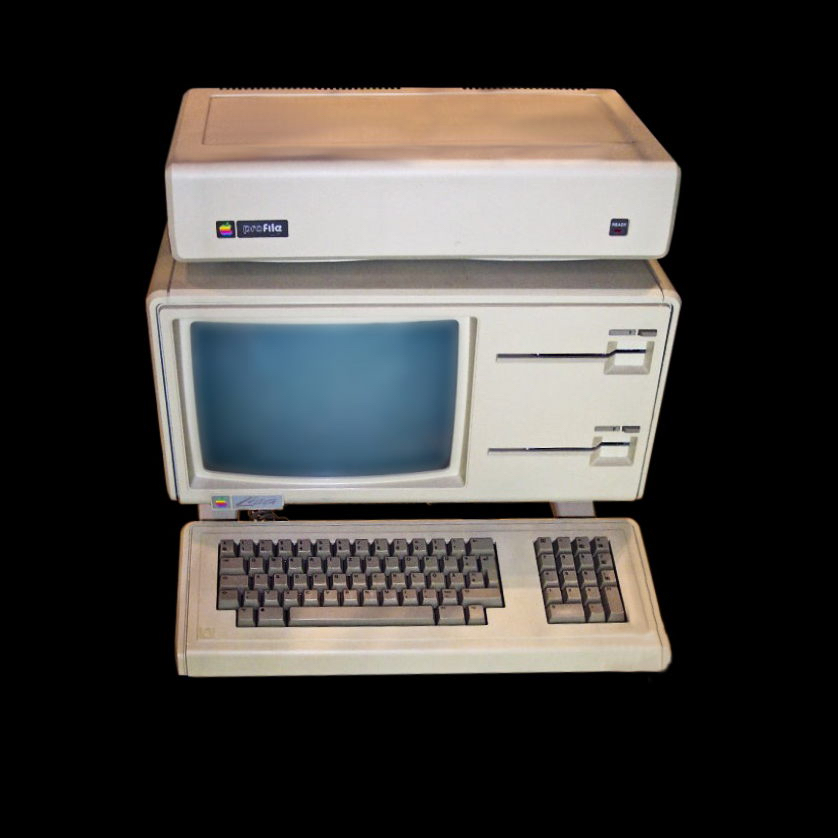

Apple’s Lisa-1 Goes for $50,300 At Technology Auction in Cologne, Germany


The Lisa was one of the first personal computers to offer a graphical user interface (GUI) in a machine aimed at individual business users. Development of the Lisa began in 1978, and it underwent many changes during the development period before shipping at the very high price of $9,995 (and that was 34 years ago) with a 5MB hard drive. The high price, relatively low performance and unreliable "Twiggy" floppy disks led to poor sales, with only 100,000 units sold.


Source: applewordtoday

Windows
Mac OS
iOS
Linux
3uTools
Win 64-bit For this device
V9.01 2025-12-27
Download
Win 32-bit For this device
V9.01 2025-12-27
Download
3uTools
Intel Chip How to Identify Chip Type
V9.0 2025-12-02
Download
Apple Silicon
V9.0 2025-12-02
Download
How to Identify Chip Type
1.  Click the Apple icon in the top-left corner of the screen and select About This Mac.
2.  Check the Processor or Chip field to determine if it is "Intel" or "Apple".
Please use the 3uTools PC client to install the iOS client:
1、 Install either the Windows or Mac version of 3uTools on your computer
2、 Open the PC client and connect your device to the computer via USB cable
3、 After the connection is successful, wait for the computer to automatically install the mobile app for the device, or locate “Install Mobile App” on the computer and manually click to install.
3uTools
deb file
V3.01 2025-11-20
Download
rpm file
V3.01 2025-11-20
Download
Windows
Windows
iOS
iOS
Android
Android
TV
TV
3uAirPlayer
Win 64-bit For this device
V6.0.2 2025-11-19
Download
Win 32-bit For this device
V6.0.2 2025-11-19
Download
iOS Device Mirroring (No App Required)
1、 Install 3uAirPlayer on the Windows PC
2、 Open Control Center and select Screen Mirroring
3、 From the list, choose your PC to start mirroring
4、 Or connect your iOS device to the PC via USB to begin mirroring
Scan to get "3uAirPlayer" App
3uAirPlayer TV V1.0.18
2025-11-28
TV System Requirements: Android 7.0 or later
Download the TV installation package, copy it to a USB drive, insert it into your TV or set-top box, then select the file from the home screen to install.




