 NEWS
NEWS
Apple Comes Under Fire for Banning Anti-abortion App
 10/19/2017
 3078
3078
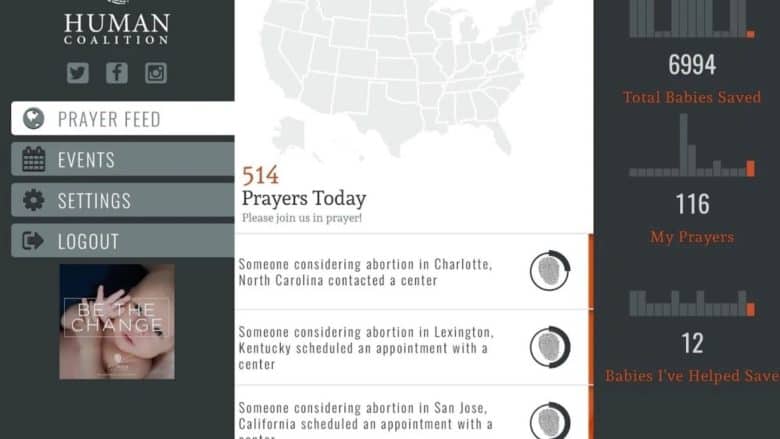
Apple has reportedly banned an anti-abortion app from the App Store after complaints were made about it from “left-wing bloggers.”
Among the features of the Human Coalition app is a “Prayer Feed,” where users can access a real-time map of the United States, allowing them to join in with the prayers of other users on behalf of “abortion-determined families.”
Anti-abortion group Human Coalition claims that, when Apple first removed the app, the company said it was due to functionality problems. However, when Human Coalition spoke with Apple representatives, they demonstrated that the app actually exceeded minimum requirements and “functioned better than similar apps from other developers.”
“There is a growing trend in the U.S. to attempt to deter or silence Americans who oppose the fatal discrimination against preborn children,” Brian Fisher, co-founder and president of Human Coalition, told Fox News. “This move by Apple is not surprising, though it is a deep disappointment. Human Coalition remains committed to providing compassionate, loving care to women and their children even in the face of these challenges.”
The Apple ban hammer
Since launching the App Store in 2008, Apple has periodically faced criticism due to its curated App Store and a sometimes inconsistent approach to banning apps.
Apple seems to have no hard-and-fast rules that govern exactly what is and isn’t permissible in the App Store (Apple apparently subscribes to former Supreme Court Justice Potter Stewart’s famous view of obscenity — “I know it when I see it“). As a result, the company and its developers run into these sorts of problems every so often.
When it comes to the subject of abortion, Apple ran into problems with pro-abortion rights activists following a Siri-related issue in 2011. When users asked Siri to show nearby facilities that offer abortion services, Apple’s AI assistant instead directed people toward adoption centers. Apple changed this in 2016.
The Human Coalition app is still available on the Google Play Store.
Source: cult of mac










