
NEWS

78% of Teens Surveyed Own an iPhone, 82% Plan to Purchase

10/12/2017

2464

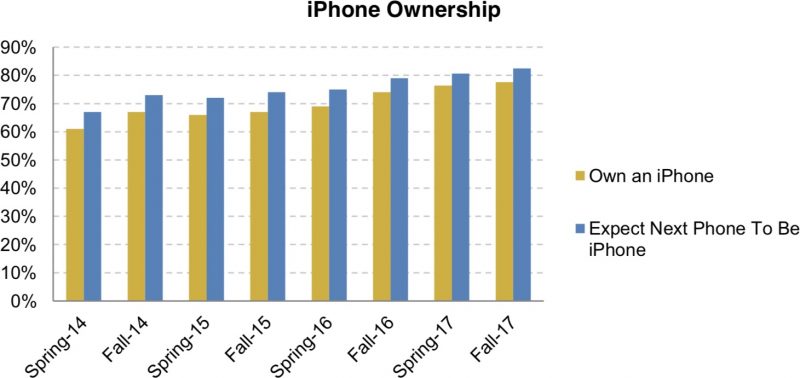
The iPhone's popularity among teens continues to grow, according to new data gathered by investment firm Piper Jaffray for the fall edition of its semiannual U.S. teen survey

78 percent of teens surveyed own an iPhone, up two percent from the spring 2017 survey conducted 
earlier this year. 82 percent of teens said their next smartphone will be an iPhone, the highest amount of interest ever noted in one of these surveys. 
78% of Teens Surveyed Own an iPhone, 82% Plan to Purchase
This jump in interest can perhaps be attributed to the 2017 iPhone lineup, which includes the iPhone X with an edge-to-edge display and a TrueDepth camera for facial recognition purposes. 

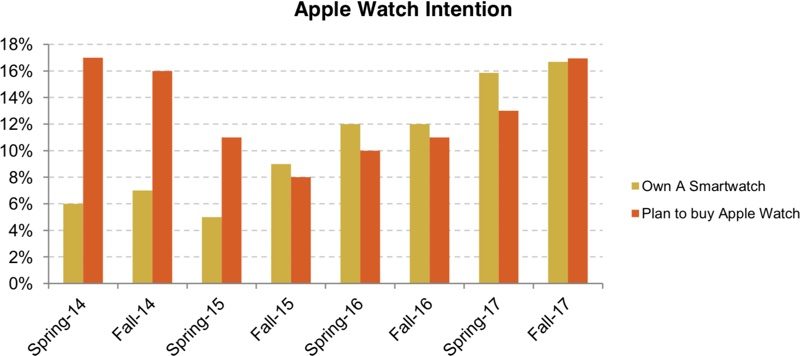
Teen interest in the Apple Watch is also up, and 17 percent of teens surveyed said they plan to buy an Apple Watch in the next six months, up from 13 percent in spring 2017. 
78% of Teens Surveyed Own an iPhone, 82% Plan to Purchase
Piper Jaffray says the survey is a "positive point" on iPhone 8 demand and iPhone X demand, and increasing interested in the Apple Watch. 
78% of Teens Surveyed Own an iPhone, 82% Plan to Purchase
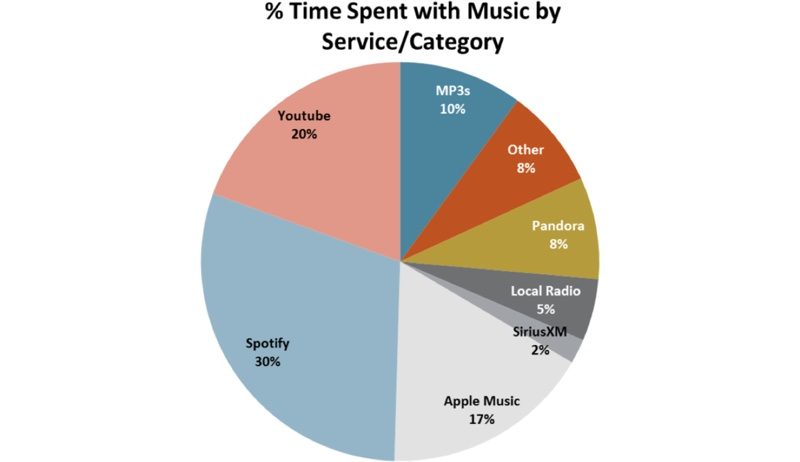
Apple Music also made an appearance in the survey, gaining share alongside Spotify and YouTube as teens move away from streaming services like Pandora.

On-demand music services like Spotify, YouTube, and Apple Music (30%, 20%, and 17%) continue to gain market share among teens, as more traditional platforms and Pandora continue to lose share.


Piper Jaffray's fall 2017 teen survey covered 6,100 teens across 44 states in the United States with an average age of 15.9 years.


Source: macrumors

Windows
Mac OS
iOS
Linux
3uTools
Win 64-bit For this device
V9.01 2025-12-27
Download
Win 32-bit For this device
V9.01 2025-12-27
Download
3uTools
Intel Chip How to Identify Chip Type
V9.0 2025-12-02
Download
Apple Silicon
V9.0 2025-12-02
Download
How to Identify Chip Type
1.  Click the Apple icon in the top-left corner of the screen and select About This Mac.
2.  Check the Processor or Chip field to determine if it is "Intel" or "Apple".
Please use the 3uTools PC client to install the iOS client:
1、 Install either the Windows or Mac version of 3uTools on your computer
2、 Open the PC client and connect your device to the computer via USB cable
3、 After the connection is successful, wait for the computer to automatically install the mobile app for the device, or locate “Install Mobile App” on the computer and manually click to install.
3uTools
deb file
V3.01 2025-11-20
Download
rpm file
V3.01 2025-11-20
Download
Windows
Windows
iOS
iOS
Android
Android
TV
TV
3uAirPlayer
Win 64-bit For this device
V6.0.2 2025-11-19
Download
Win 32-bit For this device
V6.0.2 2025-11-19
Download
iOS Device Mirroring (No App Required)
1、 Install 3uAirPlayer on the Windows PC
2、 Open Control Center and select Screen Mirroring
3、 From the list, choose your PC to start mirroring
4、 Or connect your iOS device to the PC via USB to begin mirroring
Scan to get "3uAirPlayer" App
3uAirPlayer TV V1.0.18
2025-11-28
TV System Requirements: Android 7.0 or later
Download the TV installation package, copy it to a USB drive, insert it into your TV or set-top box, then select the file from the home screen to install.




