 NEWS
NEWS
More Reports Surface of iPhone 8 Plus Devices Splitting Open
 10/05/2017
 3189
3189
Several more accounts of newly purchased iPhone 8 Plus devices splitting open have been reported this week. The number of apparently defective devices is still small, but increasing.
Anthony Wu, of Toronto, Canada, said he purchased an iPhone 8 Plus on Sunday. When he unboxed the handset, the screen was already “popped” from the chassis of the device. Wu tweeted pictures of the iPhone on Wednesday, adding that he had attempted to return the device — a request he said, at first, was rejected since it was “functioning fine.” Wu’s case is similar to a report out of Japan from last week, in which an iPhone 8 Plus had apparently split open inside its packaging before it was unboxed.
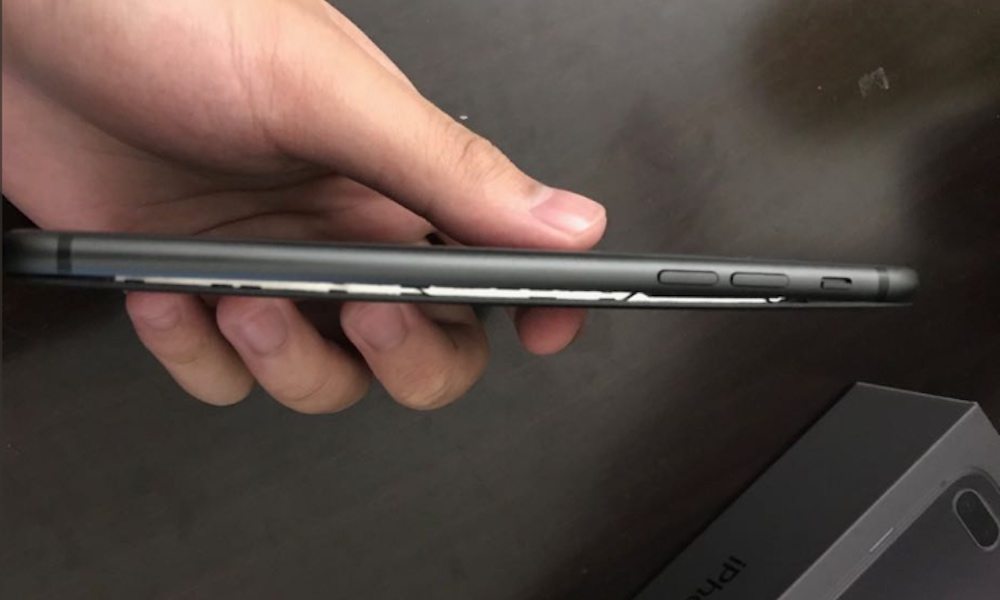
A Greek Apple repair shop named iRepair also reported a split-open iPhone 8 Plus this week. In this case, however, the shop told the publication that the device apparently split open while it was being charged overnight by the owner. This, again, lines up with a similar case last week, in which a Taiwanese woman said her iPhone 8 Plus also split while it was charging.
In both of these cases, the devices were reportedly being charged with the official Apple cable and power adapter that came in the handsets’ packaging. Of course, there’s no way to be sure if that was actually the case.
Apple obviously takes potential safety hazards very seriously. At this point, the company said that it is “aware” of the issue and is currently looking into the matter.
Despite that, it’s better to be safe than sorry. Carefully inspect your iPhone 8 Plus device after unboxing it, and keep an eye on it while it’s charging. If you suspect any problems or notice any bulging or deforming, carefully move the device to a safe location.
Source: idopnews










