
NEWS

Apple Shares iPhone X Environmental Report

09/30/2017

3168

Apple today shared an iPhone X environmental report, detailing the smartphone's environmental performance as it relates to climate change, energy efficiency, material efficiency, and restricted substances. 


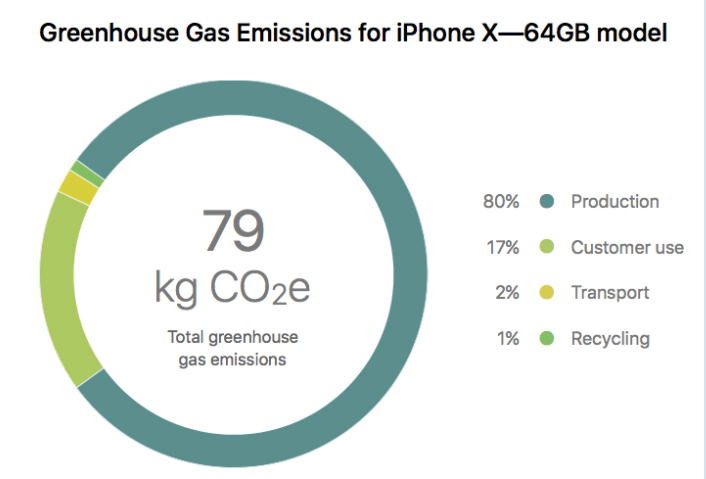
The report reveals that the base model iPhone X generates an equivalent of 79 kilograms of carbon dioxide over its life cycle, which is the highest estimated greenhouse gas emissions of any Apple smartphone since the iPhone 6 and iPhone 6 Plus. 80 percent of the emissions come from production of the device. 

Apple Shares iPhone X Environmental Report


A comparison of Apple's estimated greenhouse gas emissions for each iPhone model:

iPhone X: 79kg CO2e

iPhone 8: 57kg CO2e

iPhone 8 Plus: 68kg CO2e

iPhone 7: 56kg CO2e

iPhone 7 Plus: 67kg CO2e

iPhone 6s: 54kg CO2e

iPhone 6s Plus: 63kg CO2e

iPhone 6: 95kg CO2e

iPhone 6 Plus: 110kg CO2e

iPhone 5s: 65kg CO2e


Apple said the iPhone X's U.S. retail packaging contains 55 percent recycled content. 100 percent of the fiber in the device's box is sourced either from recycled content, bamboo, waste sugarcane, or responsibly managed forests. 

Like other models, the iPhone X has a mercury-free display made with arsenic-free glass, and it's also free of BFR, PVC, and beryllium. 

iPhone X received a highest-possible gold rating from 
EPEAT, a program that ranks mobile phones based on environmental attributes in accordance with UL 110. All models since the iPhone SE have also achieved gold ratings.


Source: macrumors


Windows
Mac OS
iOS
Linux
3uTools
Win 64-bit For this device
V9.01 2025-12-27
Download
Win 32-bit For this device
V9.01 2025-12-27
Download
3uTools
Intel Chip How to Identify Chip Type
V9.0 2025-12-02
Download
Apple Silicon
V9.0 2025-12-02
Download
How to Identify Chip Type
1.  Click the Apple icon in the top-left corner of the screen and select About This Mac.
2.  Check the Processor or Chip field to determine if it is "Intel" or "Apple".
Please use the 3uTools PC client to install the iOS client:
1、 Install either the Windows or Mac version of 3uTools on your computer
2、 Open the PC client and connect your device to the computer via USB cable
3、 After the connection is successful, wait for the computer to automatically install the mobile app for the device, or locate “Install Mobile App” on the computer and manually click to install.
3uTools
deb file
V3.01 2025-11-20
Download
rpm file
V3.01 2025-11-20
Download
Windows
Windows
iOS
iOS
Android
Android
TV
TV
3uAirPlayer
Win 64-bit For this device
V6.0.2 2025-11-19
Download
Win 32-bit For this device
V6.0.2 2025-11-19
Download
iOS Device Mirroring (No App Required)
1、 Install 3uAirPlayer on the Windows PC
2、 Open Control Center and select Screen Mirroring
3、 From the list, choose your PC to start mirroring
4、 Or connect your iOS device to the PC via USB to begin mirroring
Scan to get "3uAirPlayer" App
3uAirPlayer TV V1.0.18
2025-11-28
TV System Requirements: Android 7.0 or later
Download the TV installation package, copy it to a USB drive, insert it into your TV or set-top box, then select the file from the home screen to install.




