 NEWS
NEWS
Rare Steve Jobs-signed magazine Goes up for Auction next Month
 09/28/2017
 2771
2771
Do you fancy getting your hands on some Steve Jobs memorabilia, but can’t quite stretch to the high six figure dollar mark needed to purchase a big ticket item like an original Apple-1 computer? No problem if so — because an upcoming auction for a Steve Jobs autograph may be more in your ballpark.
The autography in question is on the front cover of a Newsweek magazine from October 24, 1988, features Jobs with his NeXT computer — the first of several computers he launched during his wilderness years outside of Apple.
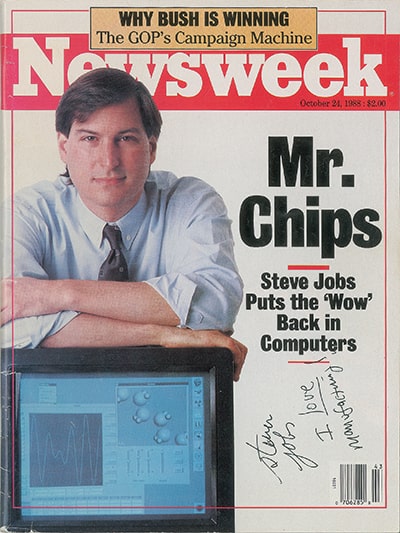
Jobs, aged 33 at the time, signed the 84-page magazine in black felt tip with the words, “Steven Jobs, I love manufacturing.” According to the person Jobs signed the magazine for, it was given when Jobs visited the Lotus Development Corporation in Cambridge, MA to show off the eagerly anticipated NeXT computer. What followed showed off an altogether different side of Jobs to the austere figure most fans are familiar with:
“I was a senior buyer at Lotus working in the manufacturing facility at the time and had somewhat of a school girls crush on Jobs’ genius and entrepreneurial spirit,” the current owner says. “Realizing his visit to Lotus was a pivotal and exciting time in his career, I stopped at a hotel gift shop and purchased some mints, along with several magazines that he was featured on … [After his talk], Steve walked off stage, came down into the front row and plopped himself on a table next to me. I froze. I showed him a pile of magazines and asked him to pick one to autograph for me. He hesitated and said ‘I don’t do autographs’ at which point I stepped closer, locked eyes, and said ‘then write something from your heart.’ He smiled from ear to ear, picked the Newsweek and jotted the words: I love manufacturing and then signed it!”
Source: cult of mac










