 NEWS
NEWS
While Apple Music Is The Least Popular Streaming Music Service
 09/08/2017
 3129
3129
Apple Music is the least popular streaming music service across the U.S. population as a whole, according to a new Fluent report seen by us, coming behind YouTube, Pandora, iHeartRadio, Google Play Music, Spotify and Amazon Prime Music. But that’s not surprising, for two reasons …
First, and most crucially, five of the top seven services offer a free, ad-supported tier. It’s obvious that more people will choose to listen to a free service than one that requires a paid subscription. Only a third of those who listen to streaming music pay for it.
Second, while Apple Music has had an Android app since 2015, it is still primarily marketed to owners of Apple devices, giving it a smaller market than services available across web, PC and mobile.
But Apple fares much better when you look at those who choose to pay for a music streaming service. There, Apple has the same popularity as Spotify among those aged 35+, and is significantly more popular with both Millennials (25-34) and Gen Z (18-24).
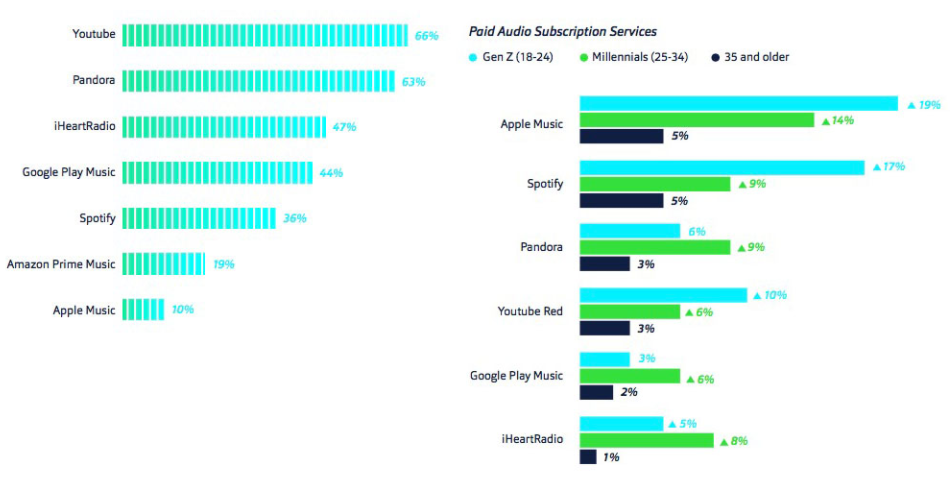
This, too, isn’t surprising when you look at the demographics. For those aged 35+, a third of the U.S. adult population owns an iPhone, but that rises to the majority – 52% – of Gen Z.
The four most important features were the same for all three age ranges, though in all cases the younger you are, the more important you are likely to consider them to be. Ability to listen to music offline was #1, ad-free music #2, tailored music recommendations #3 and the ability to share playlists with family and friends came in #4.
Competition for the all-important Gen Z demographic is increasing, Amazon recently matching Apple Music’s student deal – and throwing in a $1/month promo along the way – while Spotify just announced a $5/month bundle with Hulu.
Source: 9to5mac










