
NEWS

Apple Developer Accounts Briefly Showed Russia Addresses In An Unidentified Glitch

09/07/2017

2778

For a couple of hours today, Apple’s developer portal was down as scattered complaints arose online that some developers’ home addresses had been changed to the same address in Russia, prompting speculation that there might have been some sort of security breach. The unidentified issue, which appears to have since been resolved.


A developer named David Negron, who identifies himself as the founder of Productiontrax.com, called attention to the glitch when he tweeted that “all developer account addresses” were being shown as an address in Russia.
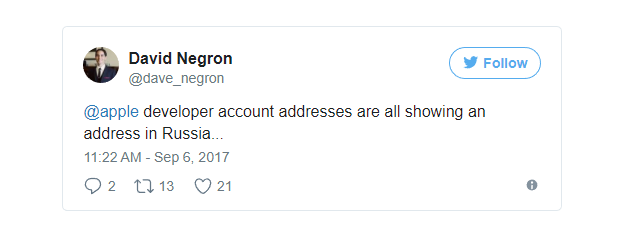

Apple Developer Accounts Briefly Showed Russia Addresses In An Unidentified Glitch


Another developer, named Kais Karim, also tweeted that he had checked four different Apple developer accounts and all showed the same address: “bul. Novatorov, Saint-Petesburg, Leningrad, 198216, Russian Federation.” Update: Interestingly, both Negron and Karim work for Quicken Loans in Detroit, Michigan, according to their online profiles; and Karim told The Verge that he noticed the erroneous Russian address was appearing in both personal and professional accounts.


It’s still unclear whether this is some sort of internal error, or a hack from an outside force. The developer site was also down briefly for “maintenance,” but it’s now back up and running, which would suggest that it was some sort of quick fix.


But the address above also has a spelling error in it — “Saint-Petesburg” — which could indicate sloppiness on the part of a bad actor rather than a technical glitch that caused a legitimate address to propagate elsewhere.


Source: theverge

Windows
Mac OS
iOS
Linux
3uTools
Win 64-bit For this device
V9.0 2025-11-11
Download
Win 32-bit For this device
V9.0 2025-11-11
Download
3uTools
Intel Chip How to Identify Chip Type
V9.0 2025-12-02
Download
Apple Silicon
V9.0 2025-12-02
Download
How to Identify Chip Type
1.  Click the Apple icon in the top-left corner of the screen and select About This Mac.
2.  Check the Processor or Chip field to determine if it is "Intel" or "Apple".
Please use the 3uTools PC client to install the iOS client:
1、 Install either the Windows or Mac version of 3uTools on your computer
2、 Open the PC client and connect your device to the computer via USB cable
3、 After the connection is successful, wait for the computer to automatically install the mobile app for the device, or locate “Install Mobile App” on the computer and manually click to install.
3uTools
deb file
V3.01 2025-11-20
Download
rpm file
V3.01 2025-11-20
Download
Windows
Windows
iOS
iOS
Android
Android
TV
TV
3uAirPlayer
Win 64-bit For this device
V6.0.2 2025-11-19
Download
Win 32-bit For this device
V6.0.2 2025-11-19
Download
iOS Device Mirroring (No App Required)
1、 Install 3uAirPlayer on the Windows PC
2、 Open Control Center and select Screen Mirroring
3、 From the list, choose your PC to start mirroring
4、 Or connect your iOS device to the PC via USB to begin mirroring
Scan to get "3uAirPlayer" App
3uAirPlayer TV V1.0.18
2025-11-28
TV System Requirements: Android 7.0 or later
Download the TV installation package, copy it to a USB drive, insert it into your TV or set-top box, then select the file from the home screen to install.




