 NEWS
NEWS
The $1,000 iPhone 8 Still Won’t Be the Most Expensive Brand New iPhone You Can Buy
 09/06/2017
 3137
3137
The iPhone 8 (or iPhone X, Pro, or whatever) is going to be an expensive phone. Just about every analyst and insider suggests that Apple’s highest-end smartphone is going to start at or near $1,000 and go up from there. That’s a big chunk of change to drop on a phone, but if you’re in the market for a never-before-used iPhone, the iPhone 8 still won’t be the most expensive thing on the market. No, that honor belongs to the iPhone 2G.
The iPhone 2G — or just “iPhone,” because it was the only one around at the time — launched way back in 2007. The decade-old technology packed in side the (comparatively) thick and stout little smartphone is antiquated, and you wouldn’t have much luck installing any of today’s popular apps on it, but that isn’t stopping people from dropping absolutely insane amount of money on the grandfather of all iPhones.
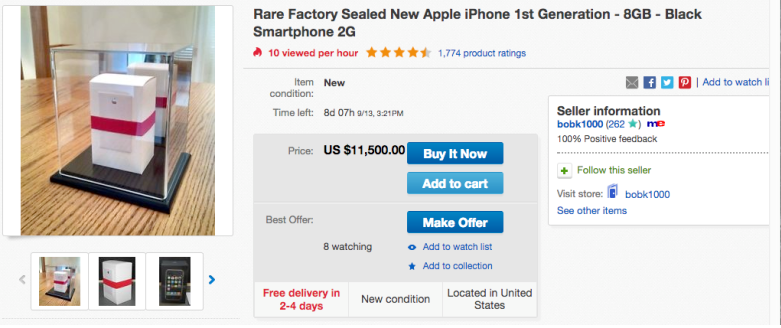
Completed listings on eBay confirm that factory sealed examples of the first iPhone are going from where between $3,000 and (gulp) $50,000.
There are only a handful of pristine original iPhones on the auction block at any given time, and that rarity leads to incredible price swings. If you’re satisfied with a merely functional iPhone 2G with a few dings and dents, you can expect to pay a few hundred dollars, but iPhones that have never seen the light of day in a decade demand truly outrageous sums.
At this point, seeking to own a brand new iPhone 2G is solely for those who simply want to posses it as a collector’s item. Many of the most expensive examples are presented in display cases, looking more like decorations for your mantle than a device you’d ever even think about using. You’d have to be a pretty hardcore Apple and/or iPhone fanboy to actually drop that kind of cash on a phone that you never plan to take out of the box, but hey, people have spent more on less interesting things in the past.
Source: bgr










