NEWS

Apple Watch Celebrates Your Birthday With A Special Message in WatchOS 4

06/16/2017

4272

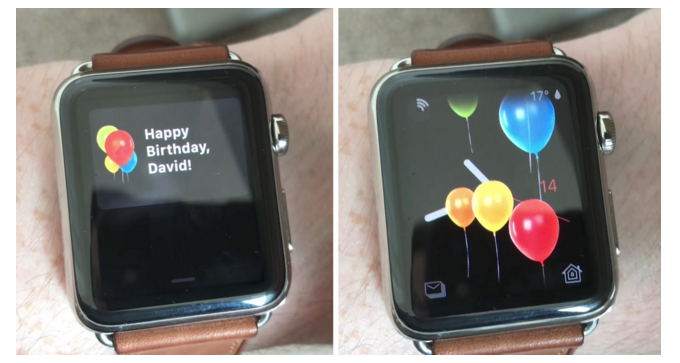
Among multiple software announcements that came out of WWDC last week, Apple unveiled details about watchOS 4, the newest operating system that will arrive on Apple Watch devices later this fall. As developers spend more time with the watchOS 4 beta, new surprises in the software become uncovered, and now Toasty has come across a previously unseen birthday-related message that Apple has included in watchOS 4. 


On your birthday, Apple will send a "Happy Birthday!" notification to your Apple Watch, and when you tap on it your watch face will be showered with celebratory balloons. The addition looks visually similar to the "Balloons" screen effect that launched in the iOS 10 Messages app last year. You can watch the full Happy Birthday animation in the video below, which was originally posted by David Boyle on YouTube

Apple Watch Celebrates Your Birthday With A Special Message in WatchOS 4


Some of the big changes coming in watchOS 4 include a collection of Activity-focused updates with more personalized achievements for the Workout app, and communication features between Apple Watch and compatible gym equipment. There are also enhancements to the Music app, and a new Siri watch face that will dynamically update based on the time of day and your daily routines, and showcase important data from apps like Activity, Alarms, Breathe, Calendar, Maps, Reminders, Wallet, and more. 


Source: macrumors

Windows
Mac OS
iOS
Linux
3uTools
Win 64-bit For this device
V9.0 2025-11-11
Download
Win 32-bit For this device
V9.0 2025-11-11
Download
3uTools
Intel Chip How to Identify Chip Type
V9.0 2025-12-02
Download
Apple Silicon
V9.0 2025-12-02
Download
How to Identify Chip Type
1.  Click the Apple icon in the top-left corner of the screen and select About This Mac.
2.  Check the Processor or Chip field to determine if it is "Intel" or "Apple".
Please use the 3uTools PC client to install the iOS client:
1、 Install either the Windows or Mac version of 3uTools on your computer
2、 Open the PC client and connect your device to the computer via USB cable
3、 After the connection is successful, wait for the computer to automatically install the mobile app for the device, or locate “Install Mobile App” on the computer and manually click to install.
3uTools
deb file
V3.01 2025-11-20
Download
rpm file
V3.01 2025-11-20
Download
Windows
Windows
iOS
iOS
Android
Android
TV
TV
3uAirPlayer
Win 64-bit For this device
V6.0.2 2025-11-19
Download
Win 32-bit For this device
V6.0.2 2025-11-19
Download
iOS Device Mirroring (No App Required)
1、 Install 3uAirPlayer on the Windows PC
2、 Open Control Center and select Screen Mirroring
3、 From the list, choose your PC to start mirroring
4、 Or connect your iOS device to the PC via USB to begin mirroring
Scan to get "3uAirPlayer" App
3uAirPlayer TV V1.0.18
2025-11-28
TV System Requirements: Android 7.0 or later
Download the TV installation package, copy it to a USB drive, insert it into your TV or set-top box, then select the file from the home screen to install.