
NEWS

Leak Purports to Show Front and Back Panels of Apple's 'iPhone 8'

06/13/2017

3315

Photos published on Monday allegedly depict the front and back panels of Apple's three 2017 iPhones, falling in line with rumors —though there may be a reason to question their authenticity.


The "iPhone 8" panels, seen on Reddit, nominally support claims of an edge-to-edge display, a glass back, and a vertically-aligned, dual-lens rear camera. If accurate, the images also support rumors that the display will be interrupted near the top for the front-facing camera, microphone, and sensors.
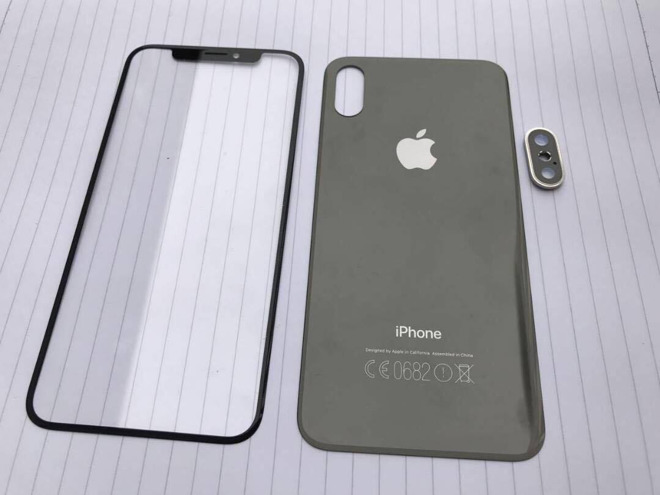

Leak Purports to Show Front and Back Panels of Apple's 'iPhone 8'


Less is shown of panels for the "iPhone 7s" and "7s Plus," but these do reinforce notions that the phones will be largely unchanged from their predecessors on the outside. They should switch to glass backs for the sake of wireless charging, like the "iPhone 8."


Raising doubts about the leak is the rear "iPhone 8" panel, which contains extra markings not seen on recent iPhones, such as the "Conformite Europeene" (CE) safety logo. The parts were reportedly delivered to Chinese manufacturers last week.


Apple is expected to announce its new iPhones at a September press event. LCD-based "7s" models will likely be ready immediately, but the "iPhone 8" —which should feature a 5.8-inch OLED display with embedded Touch ID, among other upgrades —may ship later in the year, given that mass production is only rumored to be starting in October or November.


Source: appleinsider


Windows
Mac OS
iOS
Linux
3uTools
Win 64-bit For this device
V9.0 2025-11-11
Download
Win 32-bit For this device
V9.0 2025-11-11
Download
3uTools
Intel Chip How to Identify Chip Type
V9.0 2025-12-02
Download
Apple Silicon
V9.0 2025-12-02
Download
How to Identify Chip Type
1.  Click the Apple icon in the top-left corner of the screen and select About This Mac.
2.  Check the Processor or Chip field to determine if it is "Intel" or "Apple".
Please use the 3uTools PC client to install the iOS client:
1、 Install either the Windows or Mac version of 3uTools on your computer
2、 Open the PC client and connect your device to the computer via USB cable
3、 After the connection is successful, wait for the computer to automatically install the mobile app for the device, or locate “Install Mobile App” on the computer and manually click to install.
3uTools
deb file
V3.01 2025-11-20
Download
rpm file
V3.01 2025-11-20
Download
Windows
Windows
iOS
iOS
Android
Android
TV
TV
3uAirPlayer
Win 64-bit For this device
V6.0.2 2025-11-19
Download
Win 32-bit For this device
V6.0.2 2025-11-19
Download
iOS Device Mirroring (No App Required)
1、 Install 3uAirPlayer on the Windows PC
2、 Open Control Center and select Screen Mirroring
3、 From the list, choose your PC to start mirroring
4、 Or connect your iOS device to the PC via USB to begin mirroring
Scan to get "3uAirPlayer" App
3uAirPlayer TV V1.0.18
2025-11-28
TV System Requirements: Android 7.0 or later
Download the TV installation package, copy it to a USB drive, insert it into your TV or set-top box, then select the file from the home screen to install.




