 NEWS
NEWS
Stanford Study Finds Apple Watch to be Most Accurate
 05/25/2017
 4408
4408
Stanford study finds Apple Watch top-notch heart rate monitor, mediocre calorie counter.
A new medical study from Stanford University focusing on consumer fitness tracker reliability found Apple Watch to be the most accurate heart rate monitor out of seven popular devices, though all products tested failed in terms of calorie counting.
Published in the Journal of Personalized Medicine on Wednesday, the study seeks to determine the validity of readings from commonly worn fitness trackers. The growing number of consumers buying and wearing devices with biometric capabilities presents a unique opportunity for preventative cardiovascular medicine, but error rates of these commercial products are largely unknown, the study says.
"People are basing life decisions on the data provided by these devices," Euan Ashley, DPhil, FRCP, professor of cardiovascular medicine, of genetics and of biomedical data science at Stanford said in a statement. He went on to say that consumer devices are not bound by the same regulations as medical-grade equipment, making it difficult for doctors to quantify or otherwise apply generated data to diagnoses.
To better understand the limitations of popular fitness trackers, the study pit the Apple Watch, Basis Peak, Fitbit Surge, Microsoft Band, MIO Alpha 2, PulseOn and Samsung Gear S2 against FDA approved equipment.
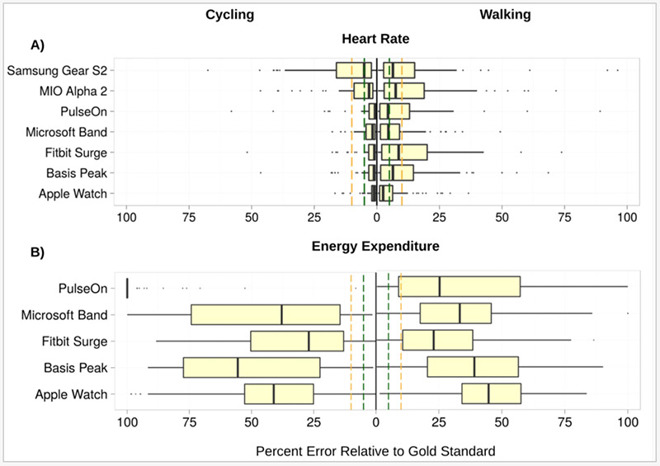
A total of 60 volunteers (31 women and 29 men) donned up to four consumer devices and participated in 80 physical tests ranging from cycling to running. Test subjects were simultaneously monitored by a 12-lead electrocardiogram and continuous clinical grade indirect calorimetry, the latter measuring for expired gas.
Researchers set an acceptable error rate at 5 percent.
Apple Watch achieved the highest heart rate accuracy across measured modes of activity with an error rate of 2 percent, followed by the Basis Peak and Fitbit Surge. Samsung's Gear S2 exhibited the highest HR error rate at 6.8 percent, outside of the study's acceptable limits.
Source: appleinsider










