
NEWS

Apple Marks Autism Acceptance Month at App Store

04/01/2017

2822

Apple is engaged in a pair of activities to promote April as Autism Acceptance Month, including a new collection at the App Store, and tailored "Field Trips" at its retail outlets.
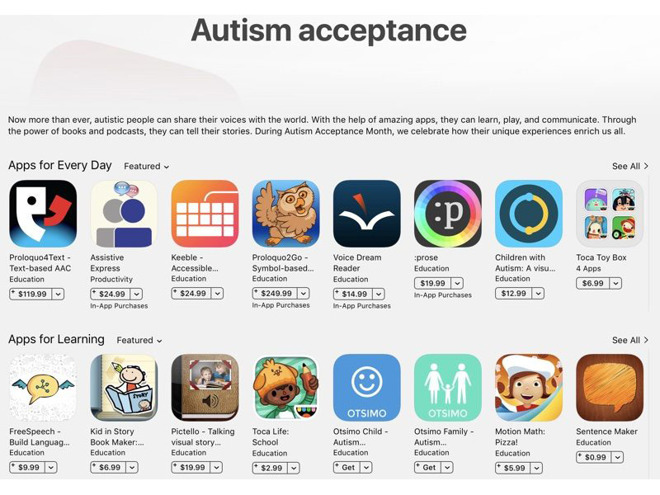

Apple Marks Autism Acceptance Month at App Store


The App Store collection gathers together various downloads useful for people autism and/or their parents, primarily apps such as Motion Math: Pizza, Toca Life: School, and the $249.99 communications interface Proloquo2Go. The page also includes books, podcasts, and courses on iTunes U.


The related Field Trips are music events featuring the Skoog, a cubic device that lets the disabled play music in GarageBand and other apps for the iPad, journalist Steven Aquino noted on Twitter. Field Trips are organized school outings where classes work on projects using Apple devices and software.


Apple has catered to the disabled for many years by selling third-party apps and accessories, and offering various OS accessibility features. Typically the company doesn't draw much attention to the fact, one notable exception being at last year's Worldwide Developers Conference, where the company took time out to promote wheelchair activity tracking in watchOS 3.


Source: appleinsider


Windows
Mac OS
iOS
Linux
3uTools
Win 64-bit For this device
V9.0 2025-11-11
Download
Win 32-bit For this device
V9.0 2025-11-11
Download
3uTools
Intel Chip How to Identify Chip Type
V9.0 2025-12-02
Download
Apple Silicon
V9.0 2025-12-02
Download
How to Identify Chip Type
1.  Click the Apple icon in the top-left corner of the screen and select About This Mac.
2.  Check the Processor or Chip field to determine if it is "Intel" or "Apple".
Please use the 3uTools PC client to install the iOS client:
1、 Install either the Windows or Mac version of 3uTools on your computer
2、 Open the PC client and connect your device to the computer via USB cable
3、 After the connection is successful, wait for the computer to automatically install the mobile app for the device, or locate “Install Mobile App” on the computer and manually click to install.
3uTools
deb file
V3.01 2025-11-20
Download
rpm file
V3.01 2025-11-20
Download
Windows
Windows
iOS
iOS
Android
Android
TV
TV
3uAirPlayer
Win 64-bit For this device
V6.0.2 2025-11-19
Download
Win 32-bit For this device
V6.0.2 2025-11-19
Download
iOS Device Mirroring (No App Required)
1、 Install 3uAirPlayer on the Windows PC
2、 Open Control Center and select Screen Mirroring
3、 From the list, choose your PC to start mirroring
4、 Or connect your iOS device to the PC via USB to begin mirroring
Scan to get "3uAirPlayer" App
3uAirPlayer TV V1.0.18
2025-11-28
TV System Requirements: Android 7.0 or later
Download the TV installation package, copy it to a USB drive, insert it into your TV or set-top box, then select the file from the home screen to install.




