NEWS

Chance the Rapper Reveals How Much Apple Music Paid for Coloring Book

03/20/2017

2705

Chance the Rapper Reveals How Much Apple Music Paid for Coloring Book


Apple’s war with Spotify for exclusives can be a great thing for artists, according to three time Grammy winner Chance the Rapper.


In a series of tweets posted this morning, Chance the Rapper elaborated on his music with Apple Music and revealed how much the company paid him for exclusive access to his award-winning album Coloring Book.


Chance has remained a fiercely independent artist by shunning labels that have offered him record deals. His decision to give Apple Music exclusive streaming rights to Coloring Book for two weeks caused some critics to question whether he’s truly an “indie,” so Chance cleared the air on Twitter.
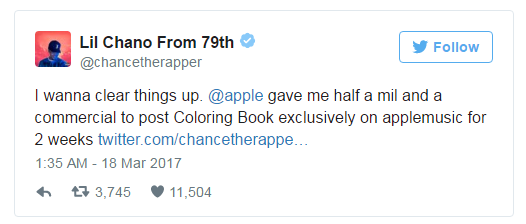

Chance the Rapper Reveals How Much Apple Music Paid for Coloring Book


Half a million for two weeks sounds like a killer deal for both parties. Especially considering Chance gave the album away for free on SoundCloud after the two weeks were up.


“I think artists can gain a lot from the streaming wars as long as they remain in control of their own product,” Chance said in another tweet. “If you come across opportunities to work with good people, pick up cash and keep your integrity I say Do It.”


Apple Music has lined up a number of exclusive album deals since launched in June 2015. Drake, Taylor Swift, Future, Frank Ocean, Travis Scott, DJ Khaled and others have all struck exclusive deals with the company.


Despite Apple’s penchant for exclusives, its paid subscriber numbers are about half of Spotify’s which recently revealed it has 40 million paying streamers. Spotify plans to take a cue from Apple Music though and pull some albums off of its free music tier.


Source: cult of mac

Windows
Mac OS
iOS
Linux
3uTools
Win 64-bit For this device
V9.0 2025-11-11
Download
Win 32-bit For this device
V9.0 2025-11-11
Download
3uTools
Intel Chip How to Identify Chip Type
V9.0 2025-12-02
Download
Apple Silicon
V9.0 2025-12-02
Download
How to Identify Chip Type
1.  Click the Apple icon in the top-left corner of the screen and select About This Mac.
2.  Check the Processor or Chip field to determine if it is "Intel" or "Apple".
Please use the 3uTools PC client to install the iOS client:
1、 Install either the Windows or Mac version of 3uTools on your computer
2、 Open the PC client and connect your device to the computer via USB cable
3、 After the connection is successful, wait for the computer to automatically install the mobile app for the device, or locate “Install Mobile App” on the computer and manually click to install.
3uTools
deb file
V3.01 2025-11-20
Download
rpm file
V3.01 2025-11-20
Download
Windows
Windows
iOS
iOS
Android
Android
TV
TV
3uAirPlayer
Win 64-bit For this device
V6.0.2 2025-11-19
Download
Win 32-bit For this device
V6.0.2 2025-11-19
Download
iOS Device Mirroring (No App Required)
1、 Install 3uAirPlayer on the Windows PC
2、 Open Control Center and select Screen Mirroring
3、 From the list, choose your PC to start mirroring
4、 Or connect your iOS device to the PC via USB to begin mirroring
Scan to get "3uAirPlayer" App
3uAirPlayer TV V1.0.18
2025-11-28
TV System Requirements: Android 7.0 or later
Download the TV installation package, copy it to a USB drive, insert it into your TV or set-top box, then select the file from the home screen to install.