
NEWS

Relocated Jacksonville Apple store to open on Mar. 11

03/10/2017

3009

A bigger, relocated Apple store in Jacksonville, Fla. will open this Saturday at 10 a.m. local time, Apple has announced. Meanwhile a shop in Grand Rapids, Mich. is also set to expand, and a completely new outlet will soon open in the Chinese city of Nanjing.


The St. Johns Town Center store in Jacksonville is being moved to 4835 River City Drive, not far from its current home at 4712. It should occupy 9,100 square feet in a space previously held by clothing retailer Forever 21.

The new location should be roughly 
twice the size of the original, and also offer better parking options for drivers. Apple will presumably be adopting its latest retail aesthetic, including touches like wooden shelves and/or an oversized video display at the back.
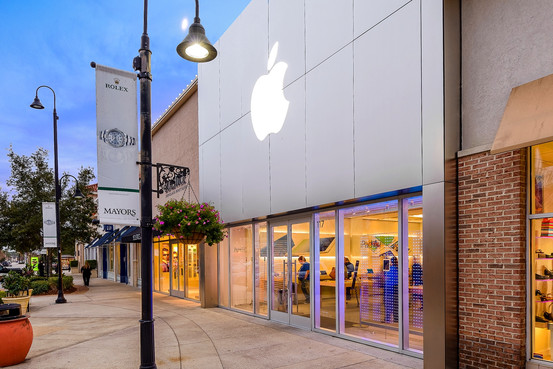
Relocated Jacksonville Apple store to open on Mar. 11


The Woodland store in Grand Rapids is also due to double in size, to 8,000 square feet, MLive said this week. The current location is extremely small by Apple standards, with just a handful of tables and relatively little space for shoppers and workers. 

No firm timeline for the Woodland expansion has been established. 
The new Nanjing outlet will debut in Jinmao Place towards the end of March, according to Storeteller, which also noted that the outlet will have an ornate staircase. Apple already has multiple stores in Nanjing, a city home to over 8.2 million people.


Source: appleinsider

Windows
Mac OS
iOS
Linux
3uTools
Win 64-bit For this device
V9.0 2025-11-11
Download
Win 32-bit For this device
V9.0 2025-11-11
Download
3uTools
Intel Chip How to Identify Chip Type
V9.0 2025-12-02
Download
Apple Silicon
V9.0 2025-12-02
Download
How to Identify Chip Type
1.  Click the Apple icon in the top-left corner of the screen and select About This Mac.
2.  Check the Processor or Chip field to determine if it is "Intel" or "Apple".
Please use the 3uTools PC client to install the iOS client:
1、 Install either the Windows or Mac version of 3uTools on your computer
2、 Open the PC client and connect your device to the computer via USB cable
3、 After the connection is successful, wait for the computer to automatically install the mobile app for the device, or locate “Install Mobile App” on the computer and manually click to install.
3uTools
deb file
V3.01 2025-11-20
Download
rpm file
V3.01 2025-11-20
Download
Windows
Windows
iOS
iOS
Android
Android
TV
TV
3uAirPlayer
Win 64-bit For this device
V6.0.2 2025-11-19
Download
Win 32-bit For this device
V6.0.2 2025-11-19
Download
iOS Device Mirroring (No App Required)
1、 Install 3uAirPlayer on the Windows PC
2、 Open Control Center and select Screen Mirroring
3、 From the list, choose your PC to start mirroring
4、 Or connect your iOS device to the PC via USB to begin mirroring
Scan to get "3uAirPlayer" App
3uAirPlayer TV V1.0.18
2025-11-28
TV System Requirements: Android 7.0 or later
Download the TV installation package, copy it to a USB drive, insert it into your TV or set-top box, then select the file from the home screen to install.




