 NEWS
NEWS
iPhone Duo StandBy Mode: New Faces and Customization Options Revealed
 09/29/2026
 1483
1483
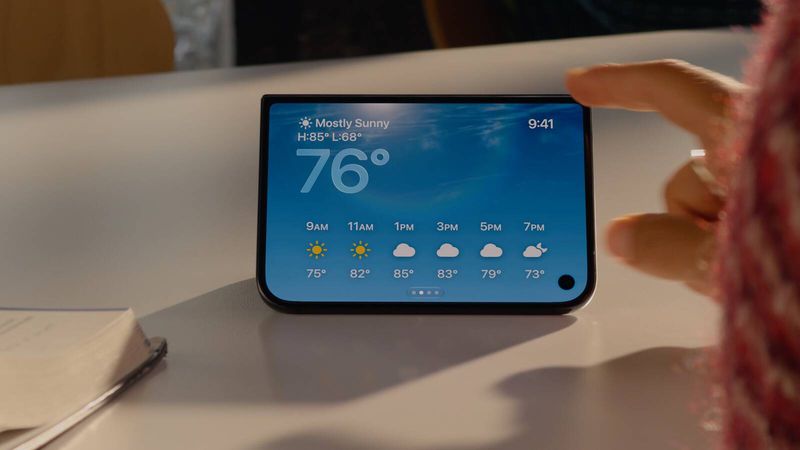
Apple's upcoming iPhone Duo is set to introduce an expanded version of StandBy mode, with new clock faces, smart home controls, customization options, and more.
While Apple has already shown glimpses of the redesigned StandBy experience in its promotional materials, a new leak from developer and leaker pdfu provides a closer look at several additional options that have not previously been reported.
iPhone Duo Could Get More StandBy Faces
Unlike the current iPhone StandBy mode, which is primarily designed to activate while the device is charging, the new StandBy experience on the iPhone Duo can reportedly remain available even when the phone isn't connected to a charger.
According to pdfu, Apple is preparing multiple StandBy faces for the foldable iPhone. Several options have already appeared in Apple's marketing materials, including:
●Analog
●Digital
●Classic Calendar
●Weather
●Photos
●Memories
●Shared Albums
●Modular
However, localization strings and the latest StandBy renderer reportedly reveal several additional faces that Apple has not yet officially announced.
Home Camera
The Home Camera face could display a live feed from a single camera or show a grid containing up to nine camera feeds.
This could make the iPhone Duo particularly useful as a smart home display when placed on a desk, nightstand, or other surface.
Home Modular
Another option, called Home Modular, appears to be designed around Apple's smart home ecosystem. While the exact interface remains unclear, its name suggests that it could provide quick access to Home controls or other smart home information.
Snoopy
A Snoopy-themed StandBy face is also reportedly in development, adding a more playful option to the lineup.
Apple has previously used Snoopy and other characters across Apple Watch faces and other parts of its ecosystem, making the addition a natural fit for StandBy.
Flow and Fade Faces Also Discovered
Two other unreleased faces have reportedly been identified: Flow and Fade.
The Flow face could feature animated visual effects, although details about how the animations will work remain unclear.
The Fade face has also appeared in localization data, but there is currently little information about its design or functionality.
Some of these faces could still be changed, delayed, or removed before iPhone Duo officially launches.
StandBy Face Editor Offers More Customization
The iPhone Duo's StandBy mode is also expected to include a dedicated face editor.
Users could customize the appearance of supported faces by selecting different visual styles and colors. The experience appears to be similar to the existing customization options available in iPhone StandBy mode.
Swipe gestures could also allow users to quickly cycle through visual adjustments without opening a separate settings interface.
Five Widget Layouts for StandBy
For clock faces that support widgets, Apple reportedly offers five different widget layouts:
●StandBy
●Stacked
●Top
●Middle
●Bottom
These layouts could give users more flexibility over how information is displayed alongside the clock, particularly on the iPhone Duo's larger inner screen.
The combination of customizable faces and widget layouts could make StandBy feel more like a dedicated smart display rather than simply an expanded lock-screen experience.
iPhone Duo Launch Date
Apple is expected to make the iPhone Duo available for pre-order on October 16, with the official launch scheduled for October 23.
With the release approaching, additional details about the foldable iPhone's software and StandBy experience are likely to emerge.
For now, Apple's StandBy implementation on the iPhone Duo appears to be significantly more customizable than the standard experience, with additional faces, smart home features, widgets, and visual customization options.
Source: macrumors










